
Someone reads your pricing page, opens two case studies and leaves without filling in a form. Your analytics records one visitor and three page views. It cannot tell you whether that was a buyer, a customer or a competitor.
Website visitor identification gets you much closer to an answer. This guide explains how it works, what it shows you, what it cannot show you, and what to do with a visit once you know who it was. We use Warm AI in the examples, because we make it.
What is website visitor identification?
Website visitor identification connects visits to your website with the companies behind them, and in the US with the people behind them. A small script on your website records each visit. The visit is then matched against business data to find out which company it came from. You see the company's name and, usually, what it does, its size and location, and which pages it read.
It is sometimes called website de-anonymization or B2B visitor identification. Reverse IP lookup is the main method behind the company-level part.
How does it work?
Every device on the internet connects through an IP address. Blocks of IP addresses are handed out by regional registries, such as RIPE NCC in Europe and ARIN in North America, to the organisations that run networks. Many companies use their own networks or fixed addresses from their internet provider.
When someone visits your website from an office network, a visitor identification tool looks up the IP address in databases that link addresses to companies. If there is a confident match, you see the company.
Different data providers hold different records, so each one recognises a different share of your visitors. Warm AI checks several providers at once, including Snitcher and RB2B along with 7 more data sources, and keeps the best match for each visit.
What do you see for each visit?
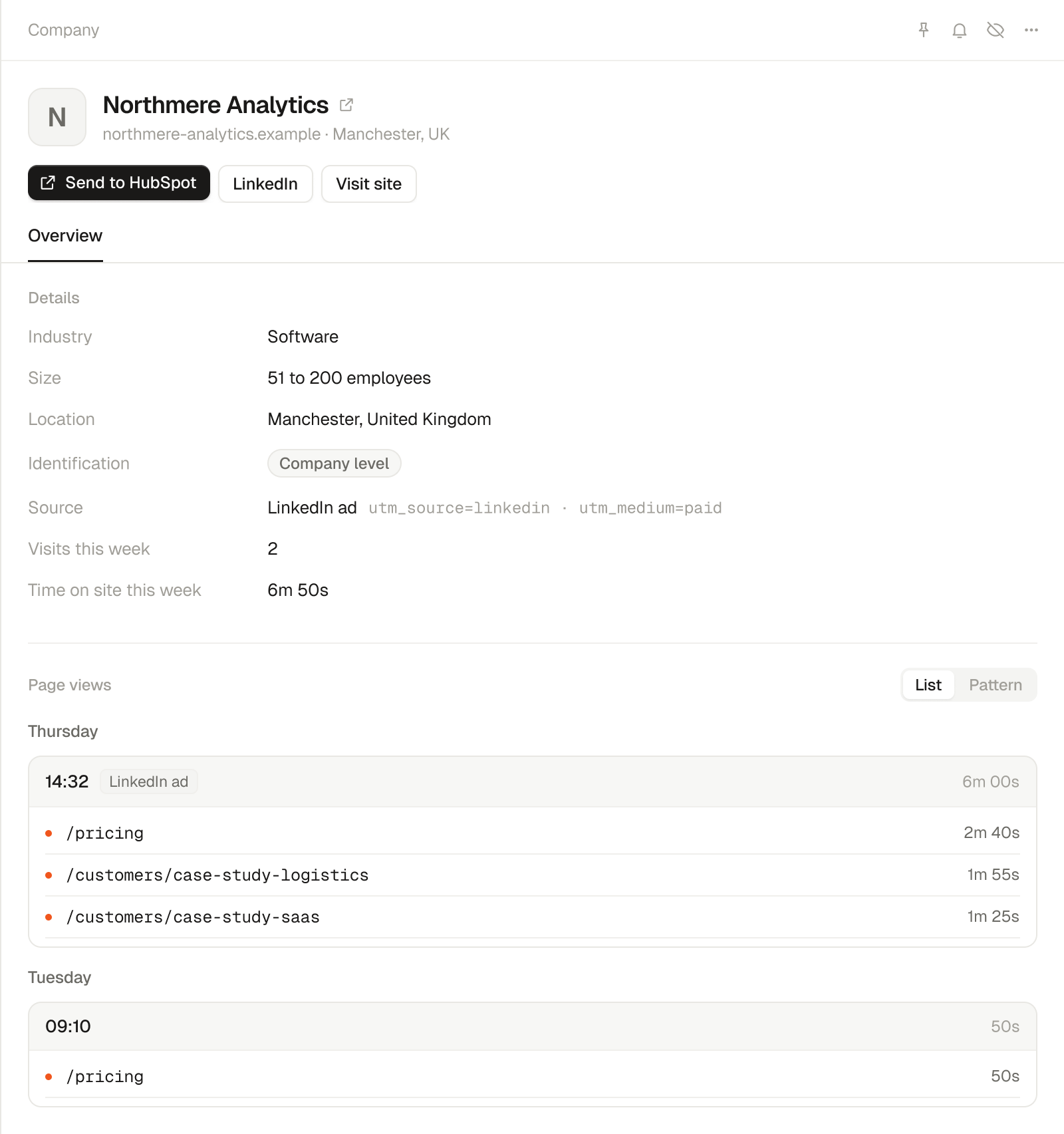
Here is an example of what Warm AI shows for a company visit from the UK. Northmere Analytics is an invented company.
| What you see in Warm AI | What you can do with it |
|---|---|
| Northmere Analytics and its website | Check what the company does and whether your team already knows it |
| Software, 51 to 200 employees, Manchester | Decide whether it looks like the customers you serve |
| Pricing page, then two case studies, 6 minutes | See which parts of your offer got attention |
| Came from a LinkedIn ad, from the UTM tags on the ad link | See which campaign brought them in, when your ad links carry UTM tags |
| Back again two days later | Spot companies that keep coming back |
A company name is far more useful than a page view count. On its own, it still does not tell you who was reading or whether they are ready to buy.
Can it tell you which person visited?
In the US, sometimes. In the UK and EU, not from the visit alone.
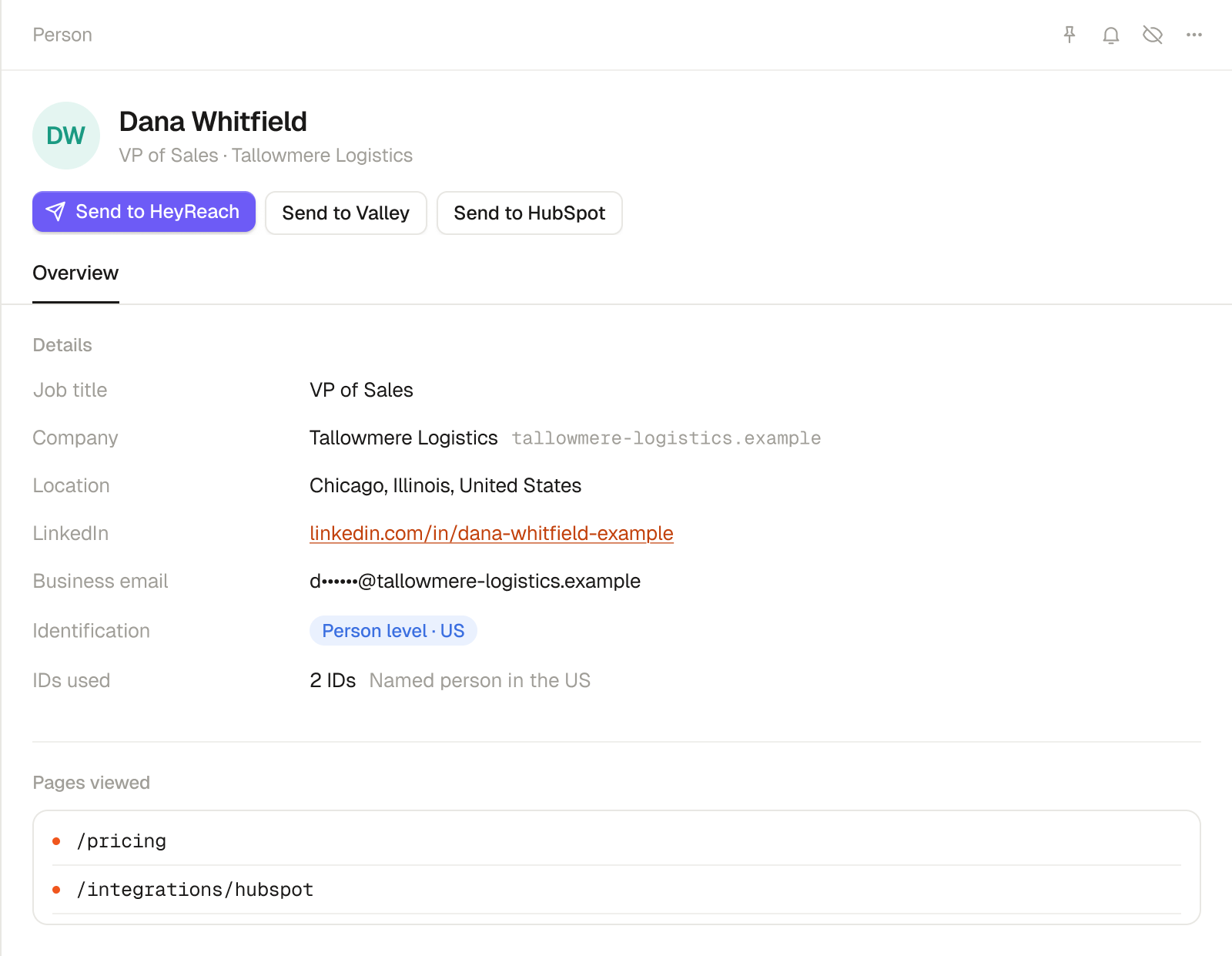
For US visitors, some tools can name the individual person. Warm AI does this through a US person-level data provider that only matches visitors in the US. Where it finds a match, you see the person's name, job title, LinkedIn profile and, where available, their business email address.
| Type of match | What it tells you | What it does not tell you |
|---|---|---|
| A company match | A visit was matched to Northmere | Which Northmere employee was reading |
| A named person (US only) | The visit was matched to Dana Whitfield, VP of Sales at Tallowmere Logistics, an invented example | That Dana is the person who will buy |
| A known visitor, from your own forms or logins | Who filled in a form or logged in | Anything about visitors who did neither |
UK, EU and all other visitors are identified as companies, not named people. On your Warm AI plan, a company uses 1 ID a month, however often it comes back, and a named US person uses 2.
Why do some visits stay anonymous?
Because no tool identifies every visit. Matching depends on the network a visit comes from:
- Office networks often trace back to a company.
- Home broadband usually traces back to the internet provider, such as BT or Virgin Media, not the employer.
- Mobile networks often share one IP address between many people at the same time, so the address points to the mobile network.
- VPNs and hosting services hide the visitor's own network.
- Bots are not people at all, and good tools filter them out.
An unmatched visit is not a bad lead. It is a visit without a usable match. If a vendor says it identifies all your visitors, ask how, and test it on your own traffic. Our guide to a good match rate explains what to expect.
How is it different from website visitor tracking?
Visitor tracking usually means analytics: tools such as Google Analytics 4 and Microsoft Clarity that show what visitors do on your website. Visitor identification shows who the visitor is. Analytics helps you improve your website. Identification helps you follow up with the companies that visit. See our guide to the best website visitor tracking software.
Is website visitor identification legal?
It can be, when it is done properly. In the UK and EU, a tool that stores or reads information on the visitor's device usually needs consent through your cookie banner, and you need a lawful basis under GDPR and a clear privacy notice. Warm AI waits for your cookie banner's consent before it records UK and EU visitors, and shows them as companies. Our guides to GDPR and cookie consent explain the rules.
What should you do with an identified visit?
Our view: do not send every visit to your sales team. If every alert looks the same, they will soon stop reading them. Decide which visits deserve attention first.
Follow up when:
- The company fits your ideal customer and read pages that show buying interest, such as pricing or case studies.
- The company is already in your CRM with an open or recently lost deal.
- A named US visitor matches the role you sell to.
Leave it when:
- The company is not one you sell to.
- The visit was a single short page view with no return.
Then send the visits that matter to where your team works: companies to HubSpot, alerts to Slack or email, and named US visitors into HeyReach or Valley campaigns.
So, what does website visitor identification actually give you?
It shows which companies visit your website, what they read and how often they come back. In the US it can also name the person. It will not match every visit, and in the UK and EU it shows companies rather than people. That is still enough to stop guessing who is interested and start following up with the right companies.
Frequently asked questions
What is website visitor identification?
Software that matches visits to your website with the companies behind them, and in the US with the people behind them, so you can follow up with visitors who never filled in a form.
How does website visitor identification work?
A script on your website records each visit. The visitor's IP address is matched against databases that link addresses to companies. Some tools check several data providers and keep the best match.
Is website de-anonymization the same as visitor identification?
Yes. Both terms describe matching anonymous website visits to the companies, and in the US the people, behind them.
Can visitor identification name individual people?
For US visitors, some tools can, including Warm AI and RB2B. UK and EU visitors are shown as companies.
Why doesn't visitor identification identify every visitor?
Visits from home broadband and mobile networks usually trace back to the internet provider, and visits through VPNs trace back to the VPN company, not the visitor's employer. So no tool can match them all.
Start your 14-day free trial and see which companies visit your website. No card needed.