
The short answer
When a company visits your website, email them while the interest is fresh, and use what they looked at to decide what to say, without ever mentioning the visit. Sort visitors by how interested they look, find the right person, write under 100 words with one easy question, and follow up three or four times. This playbook walks through each step, with templates for nine common situations.
Who this playbook is for
You use a website visitor identification tool like Warm AI to see which companies, and in the US often which people, are visiting your website. That's the hard part done: you know who's interested before they've filled in a form.
This playbook covers what happens next: who to email, what to say, when to follow up and how to handle replies. It's written for founders, sales reps and anyone else doing outreach, whether you send ten emails a week or a hundred a day.
Why visitor emails work, and why most fail
A normal cold email goes to someone who has never heard of you and isn't thinking about your problem. A visitor email goes to a company that was looking at your website this week. That timing is the whole advantage.
Most teams waste it in one of three ways:
- They wait. The visit happens on Monday, the email goes out the following week, and by then the person has moved on or picked a competitor.
- They're creepy. "I noticed you were on our pricing page yesterday" makes people feel watched. They don't reply, and some complain.
- They send everyone the same email. Someone who read one blog post and someone who checked your pricing page three times are in different places, and shouldn't get the same message.
The golden rule: use the visit, don't mention it
The visit tells you who to email and what to talk about. It should never be the reason you give for emailing.
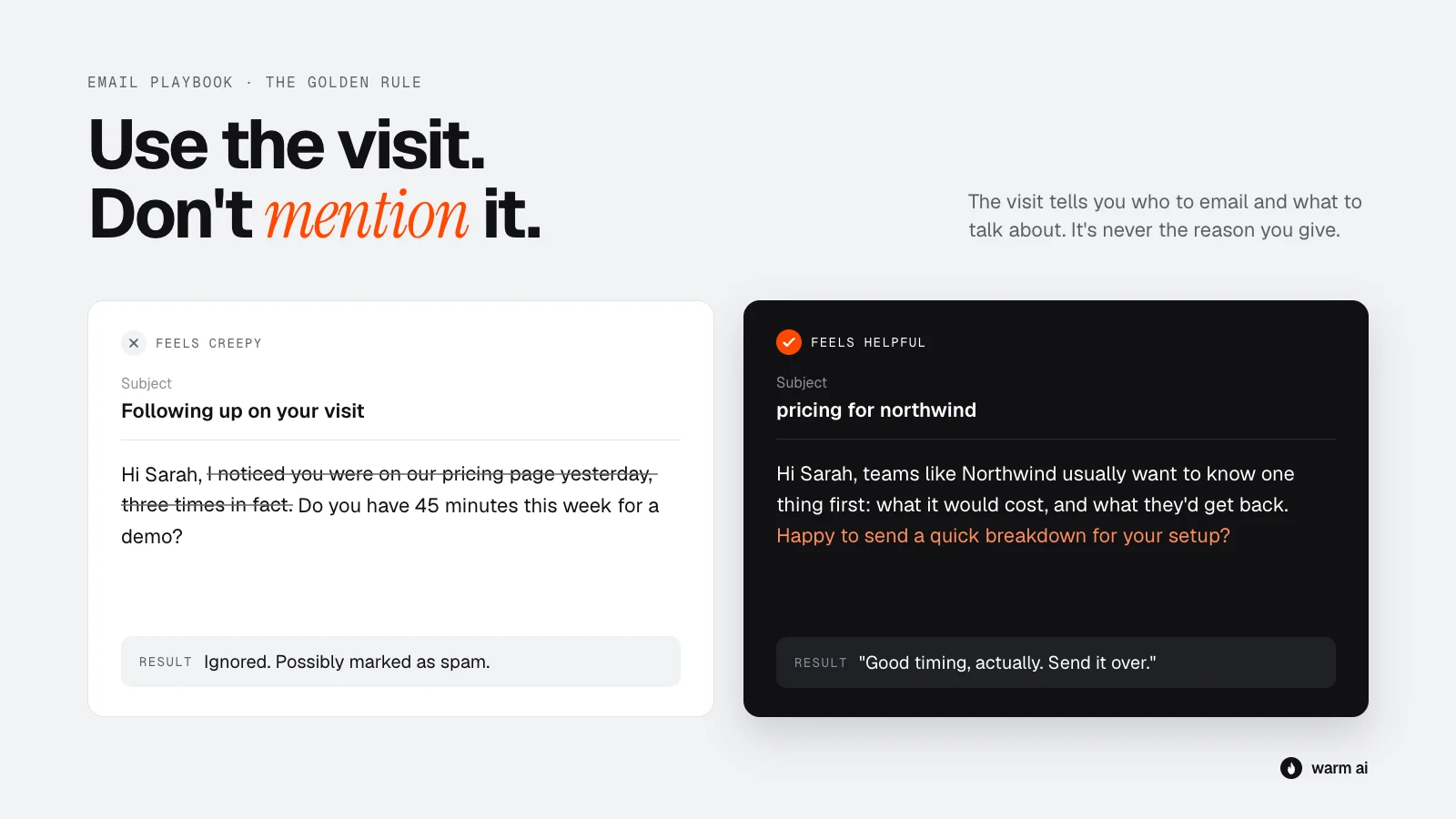
| Don't write | Write instead |
|---|---|
| "I saw you were on our pricing page." | "Most teams your size ask how pricing works once they're past 10 users, so here's the short version." |
| "Our tracking shows someone from Acme visited our site." | "I work with a few logistics firms like Acme on [problem]." |
| "Noticed you read our article on onboarding." | "Quick question: how are you handling onboarding for new clients at the moment?" |
| "You visited 4 times this week!" | Say nothing about it. Just send your strongest, most relevant email, fast. |
Think of it like a shop. A good salesperson sees you looking at the coats and comes over to say, "Those run a bit small, by the way." They don't say, "I've been watching you look at coats for six minutes."
If someone asks how you found them, be honest. The section on handling replies below has exactly what to say. The rule is about not opening with the visit, not about hiding it.
Before you start: protect your inbox
Visitor emails only work if they land in the inbox, not in spam. If you already send cold email and your replies are healthy, skip this. If not, sort these out first:
- Use a separate sending domain. If your site is acme.com, send outreach from something like getacme.com. If anything goes wrong, your main company email is protected.
- Set up SPF, DKIM and DMARC. These three settings prove to Gmail and Outlook that your emails really come from you. Your email provider or IT person can set them up quickly.
- Warm up new inboxes. A brand-new account that suddenly sends 100 emails looks like spam. Start with 10 to 20 a day and build up over 2 to 4 weeks.
- Keep volume sensible. Around 30 to 50 cold emails per inbox per day is a safe ceiling for most setups. If you need more, add inboxes rather than pushing one harder.
- Send plain text. No images, no designed templates. It should look like an email one person typed to another.
- Go easy on links. No links in the first email is safest. One at most.
- Make opting out easy. A line like "If this isn't relevant, just let me know and I won't follow up" keeps you polite and keeps complaints down.
Step 1: Sort your visitors by interest
Not every visit deserves an email, and not every email should be the same. Put each visiting company into one of three groups. For the signals behind this in more depth, see which website signals mean someone is ready to buy.
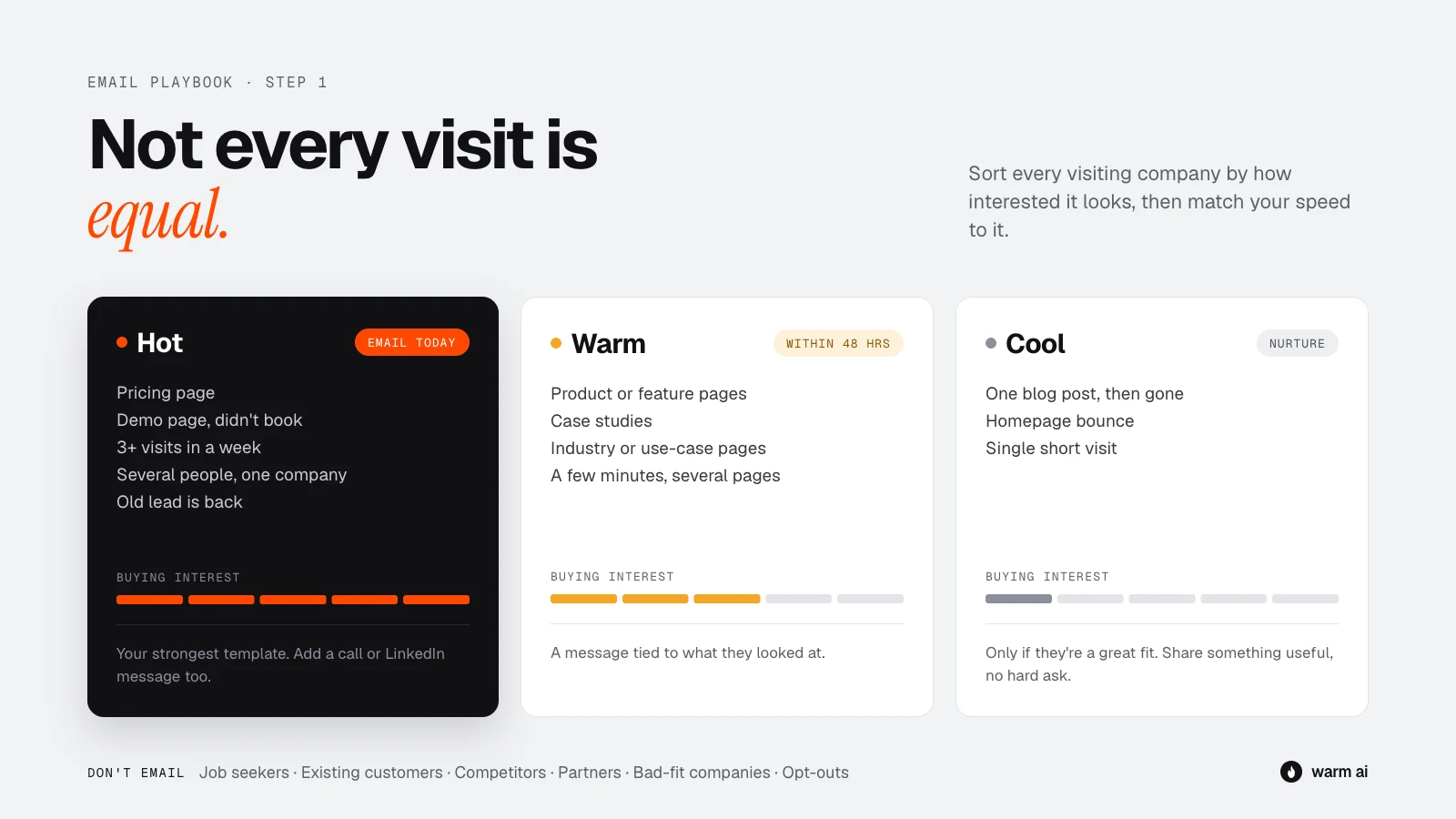
Hot: email today
They're probably comparing options right now.
- Visited your pricing page
- Visited your demo, contact or book a call page but didn't book
- Three or more visits in a week
- Several people from the same company visiting
- Looked at comparison pages, such as "You vs Competitor"
- A past lead or lost deal has come back
What to do: email within a few hours if you can, same day at the latest. Use your strongest, most specific template, and consider a phone call or LinkedIn message too.
Warm: email within 1 to 2 days
They're interested and learning, but not necessarily buying yet.
- Visited product or feature pages
- Read case studies or customer stories
- Visited an industry or use-case page
- Spent a few minutes on the site and visited more than one page
What to do: email within 48 hours with a message tied to what they looked at.
Cool: nurture, don't push
Early curiosity, or they just stumbled in.
- Read one blog post and left
- Landed on the homepage and bounced
- A single short visit
What to do: only email them if they're a great fit for your business. Keep it light: share something useful, with no hard ask. If they come back, they move up a group.
Don't email at all
Filter these out before you do anything else:
- Job seekers: visits that only touched your careers page
- Existing customers: they need their account manager, not a cold email (template 9 covers the right approach)
- Competitors
- Partners, investors and suppliers you already know
- Your own team and agencies working for you
- Bad-fit companies: too small, wrong country, wrong industry
- Anyone who has asked not to be contacted
Step 2: Find the right person
For US visitors, Warm AI can often name the person who visited. Elsewhere, and whenever a person can't be matched, you'll know the company but not the individual. Handle the two cases differently.
When you know the person
Check two things before you email:
- Are they the right person? An intern researching tools for their boss is useful to know about, but probably isn't the buyer. Email them and the decision-maker.
- Do they still work there? Check LinkedIn quickly. People change jobs often.
When you only know the company
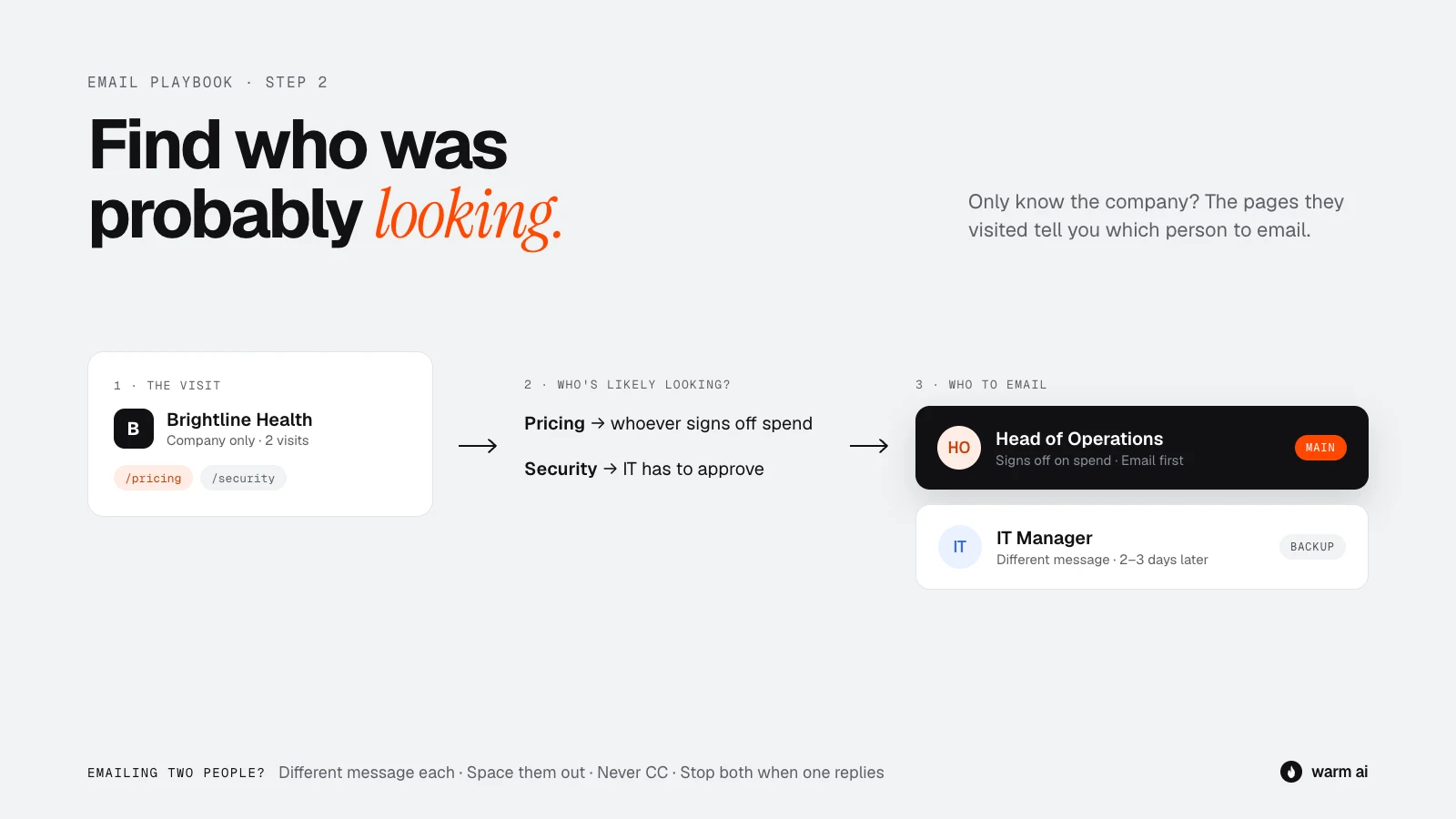
Use the pages they visited to work out who was probably looking:
| Pages they visited | Likely person to email |
|---|---|
| Pricing, plans, billing | Founder, head of department, finance or operations lead |
| Technical docs, integrations, API, security | Engineering lead, IT manager, CTO |
| Features, product tour | The team lead who would use it day to day |
| Case studies for their industry | Head of the department your product serves |
| Comparison pages | Whoever owns the tool you're being compared to |
Then pick one main person (the most likely decision-maker) and one backup (someone who would use the product day to day).
Emailing more than one person
For Hot companies, especially when several people visited, it's worth contacting two or three people:
- A different message for each person. The finance lead cares about cost; the team lead cares about saving time.
- Space them out. Email the main person first, and the second person 2 to 3 days later.
- Never CC them together on a cold email.
- Stop everyone the moment anyone at that company replies.
Step 3: Read the visit
Before you write a word, spend 60 seconds on what they did on your site. The pages they visited tell you what's on their mind, and that becomes the angle of your email.
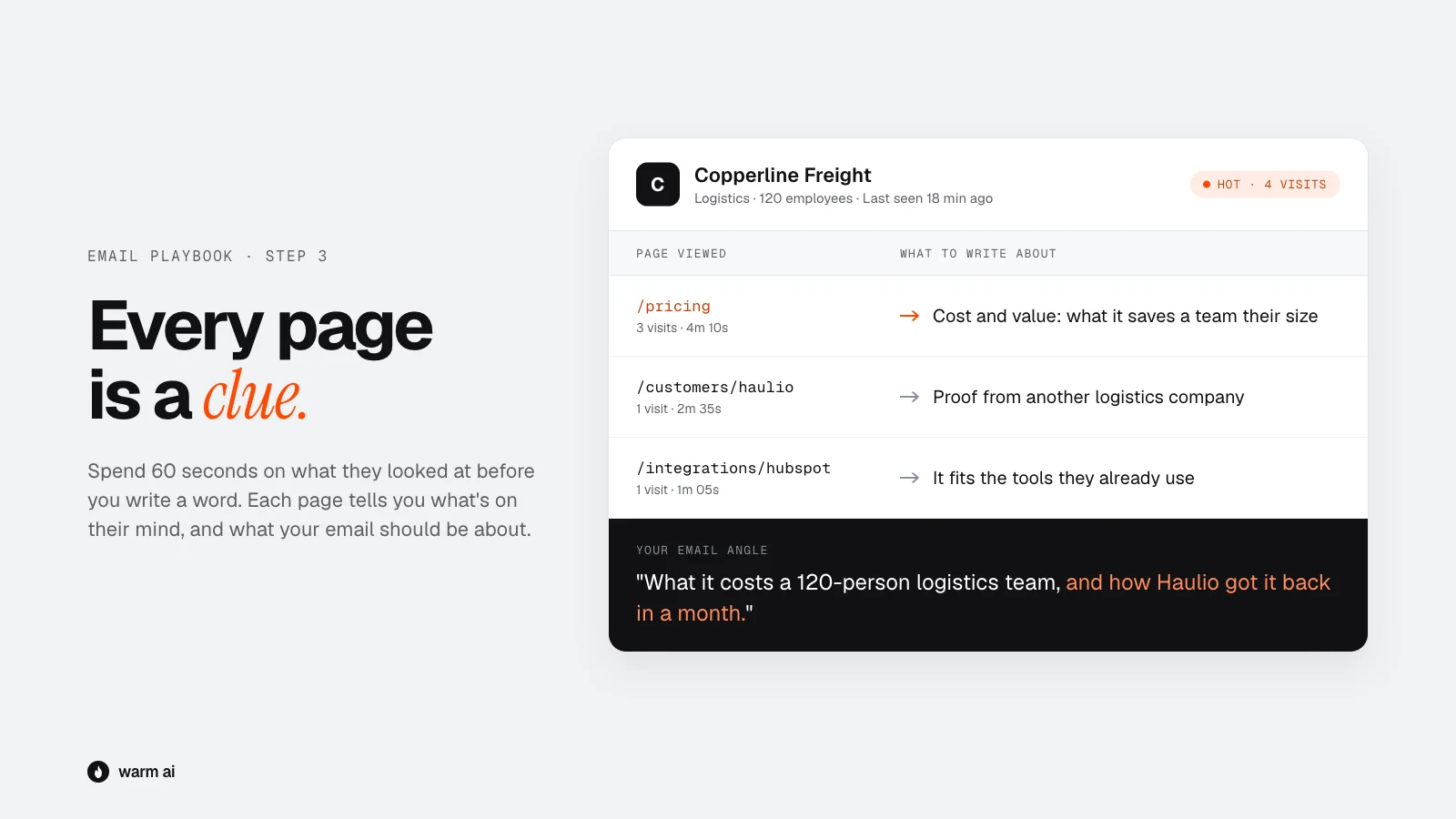
| What they looked at | What it probably means | The angle for your email |
|---|---|---|
| Pricing | "Can we afford this? Is it worth it?" | Value and cost: what it saves, typical results, how pricing works for a team like theirs |
| Demo or contact page, didn't book | "Interested, but not ready to talk to sales" | Lower the barrier: a short video, a quick answer by email, or a 15-minute call |
| A specific feature | "Does it solve this problem?" | That one problem, and how others solved it |
| Case studies | "Has this worked for companies like us?" | A result from a similar company |
| Industry or use-case page | "Is this built for our world?" | Their industry's language and specific challenges |
| Comparison page | "We're choosing between you and someone else" | Be honest about where you're different. Never trash the competitor |
| Integrations | "Will it work with what we already use?" | Confirm it fits their setup and how quick it is to connect |
| Security or compliance | "Will IT or legal approve this?" | Offer security documents or to answer questions directly |
| Blog post | "I'm curious about this topic" | Continue the conversation with something genuinely useful |
| Careers page only | Job seeker | Don't email |
Also note how many times they've visited, when they last visited, and anything public about the company, such as recent funding, hiring or a new leader. Public news is fair game to mention.
Step 4: Write the email
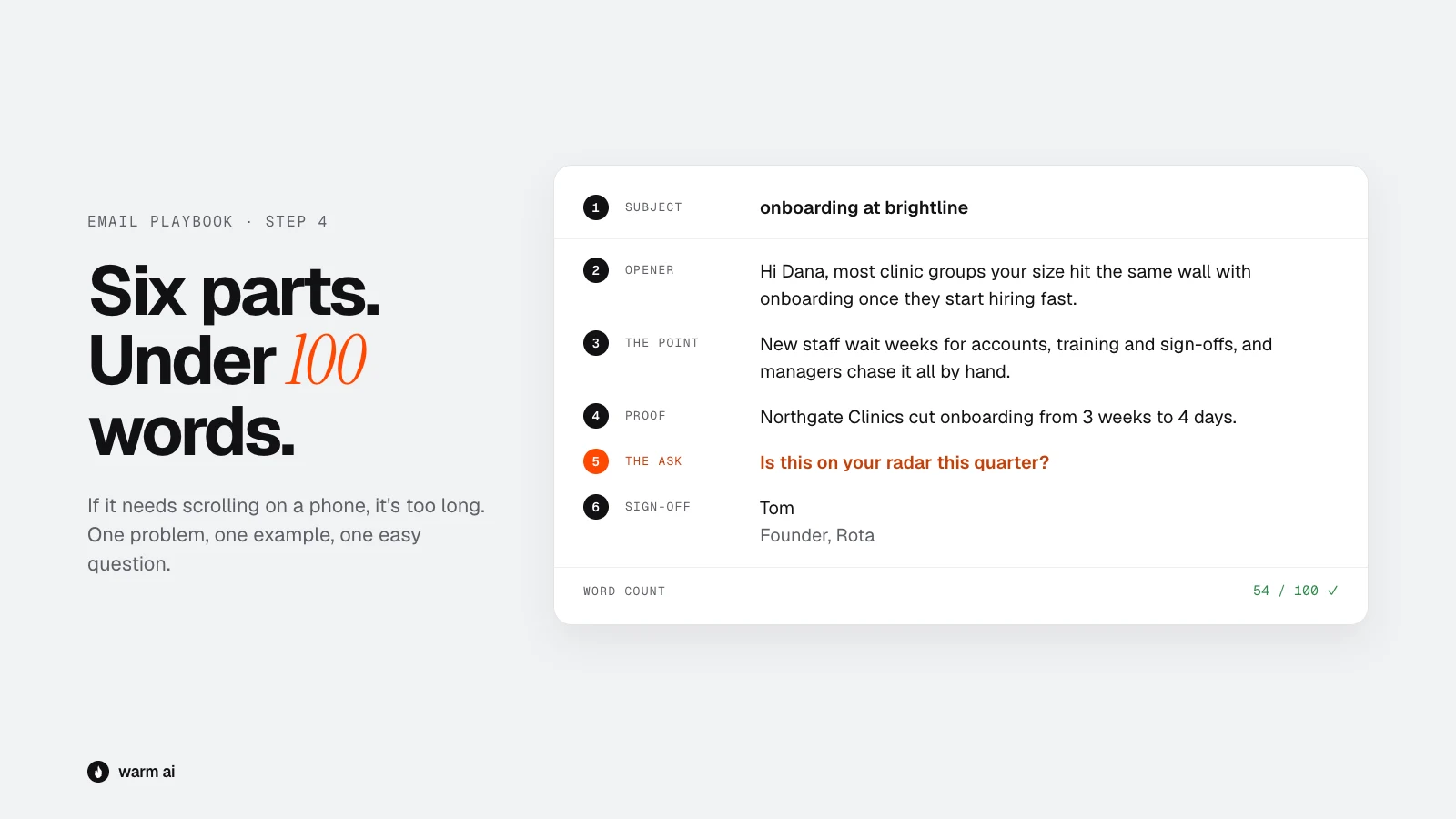
The six parts of a visitor email
- Subject line: short, lowercase, looks internal. Two to five words that look like a colleague sent them, such as
pricing for acmeorquick question, sarah. Avoid "Transform your workflow today!" or "Following up on your visit". - Opener: about them, not you. One sentence that shows you know who they are, such as "Most ops teams at 50 to 200 people hit the same wall with [problem] once they start hiring fast." Skip "I hope this finds you well" and "My name is…".
- The point: one problem, one idea. Based on what they looked at, in one or two sentences. Their problem in plain words, not a list of features.
- Proof: one short, specific example. "Brightline cut onboarding from 3 weeks to 4 days" beats "the leading AI-powered platform trusted by thousands".
- The ask: small and easy. A question they can answer in one line: "Worth a quick look?" or "Is this on your radar this quarter?" Not "Are you free for a 45-minute demo on Tuesday?"
- Sign-off: human and short. First name, title and company. No giant signature.
The rules
- Under 100 words. Most good visitor emails are 50 to 80. If it needs scrolling on a phone, it's too long.
- One ask only.
- Write like you talk. Read it out loud. If it sounds like a brochure, rewrite it.
- No attachments in the first email.
- Personalise the first line and the angle. The rest can come from a template.
- Send from a real person, not sales@ or team@.
- Send on weekdays, ideally in the morning in their time zone.
Step 5: Nine email templates
Copy these, then make them your own. Anything in {{double brackets}} needs filling in. Each one is under 100 words.
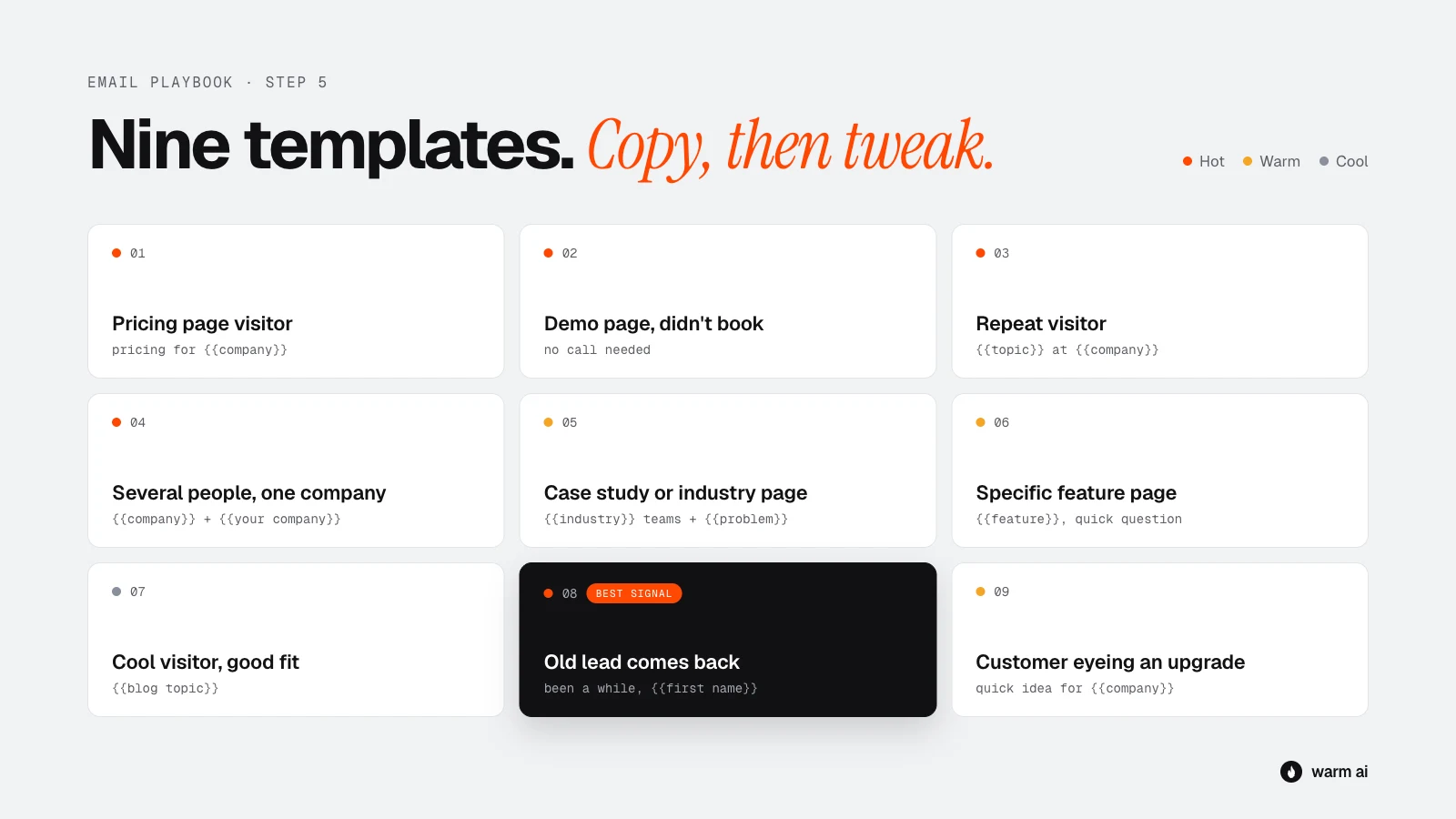
1. Pricing page visitor (Hot)
For when they looked at your pricing page, maybe more than once.
Subject: pricing for {{company}}
Hi {{first name}},
Teams like {{company}} usually want to know one thing before anything else: what it would actually cost them, and what they'd get back.
For a {{team size or company type}}, most of our customers land on {{plan or price range}}, and typically see {{specific result}} within the first month.
Happy to send a quick breakdown for your setup if that's useful?
{{your name}}
Why it works: it answers the question they were already asking, without saying you saw them asking it.
2. Demo or contact page, didn't book (Hot)
For when they visited your demo or "book a call" page but didn't go through with it.
Subject: no call needed
Hi {{first name}},
Not everyone wants to jump on a sales call just to see if something's a fit, and that's fair.
So here's the short version: we help {{type of company}} {{main outcome}} without {{main pain}}. {{Customer name}} used it to {{result}}.
If it helps, I can send a 2-minute video walkthrough instead. No call, no pressure. Want it?
{{your name}}
Why it works: they were close to booking but something stopped them. This removes the pressure.
3. Repeat visitor (Hot)
For three or more visits in a short time.
Subject: {{topic}} at {{company}}
Hi {{first name}},
When a {{industry}} team starts looking at {{problem area}} seriously, it's usually because {{common trigger}}.
If that's where {{company}} is, a few things worth knowing:
– {{key point 1}}
– {{key point 2}}Is this something you're actively looking at, or more early research?
{{your name}}
Why it works: repeat visits usually mean active evaluation, and the closing question is easy to answer either way.
4. Several people from the same company (Hot)
Send a tailored version to each person, a couple of days apart.
Subject (decision-maker): {{company}} + {{your company}}
Hi {{first name}},
It sounds like {{problem area}} might be on the agenda at {{company}}. It's a common one for teams growing past {{size}}.
The leaders we work with usually care most about {{outcome for a leader}}. {{Customer}} got {{result}} in {{timeframe}}.
Who's the best person to talk to about this on your side?
{{your name}}
Subject (day-to-day user): {{task}} at {{company}}
Hi {{first name}},
Quick one: how are you handling {{specific task}} at the moment?
Most {{job title}}s I speak to are stuck doing it {{the painful way}}. We built {{product}} to {{make it easier, in one line}}.
Worth a look?
{{your name}}
Why it works: each person gets a message about what they care about, and "who's the best person" often gets you forwarded internally.
5. Case study or industry page (Warm)
Subject: {{industry}} teams + {{problem}}
Hi {{first name}},
We work with a few {{industry}} companies like {{similar customer}}, and the problem that comes up again and again is {{problem}}.
{{Similar customer}} went from {{before}} to {{after}} in {{timeframe}}.
Is that something {{company}} deals with too?
{{your name}}
Why it works: they were looking for proof that you work for companies like theirs. This gives it to them directly.
6. Specific feature page (Warm)
Subject: {{feature topic}}, quick question
Hi {{first name}},
Quick question: how is {{company}} handling {{the problem the feature solves}} today?
Most teams we talk to are {{common painful approach}}, which works until {{when it breaks}}.
We've got a simple way around it. Happy to show you how {{customer}} does it if useful?
{{your name}}
Why it works: it opens with a question about the problem, not the feature, which makes it a conversation instead of a pitch.
7. Cool visitor, good fit (Cool)
A single blog visit, but the company is a great fit. Keep it light.
Subject: {{blog topic}}
Hi {{first name}},
We put together {{a useful resource, such as a one-page checklist}} on {{blog topic}} for {{type of company}}. It's the thing our customers say they wish they'd had earlier.
Want me to send it over? No strings.
{{your name}}
Why it works: they were curious about a topic, so you offer more of the same, with no sales pressure.
8. Old lead or lost deal comes back (Hot)
Someone you've spoken to before is visiting again. Because you already know each other, this is the one situation where it's fine to be more direct.
Subject: been a while, {{first name}}
Hi {{first name}},
It's been {{time}} since we last spoke about {{topic}}. Hope things are going well at {{company}}.
A few things have changed on our side since then: {{one or two relevant updates}}. That was one of the things that held things up last time.
Is it worth picking the conversation back up?
{{your name}}
Why it works: they already know you, and mentioning what's changed answers the reason they didn't buy before.
9. Existing customer looking at an upgrade (Warm)
A current customer is looking at a plan, add-on or product they don't have. This shouldn't feel like sales. It should come from their account manager or main contact.
Subject: quick idea for {{company}}
Hi {{first name}},
Hope {{product they use}} is still treating you well.
A few customers at your stage have started using {{upgrade or other product}} to {{outcome}}. Given {{something specific about how they use you}}, I thought it might be useful for you too.
Want me to show you how it would work with your setup?
{{your name}}
Why it works: it comes from someone they know and is tied to how they already use you.
Step 6: Follow up
Plenty of replies come from the second, third or fourth email, not the first. People are busy. A polite follow-up isn't annoying; it's a reminder.
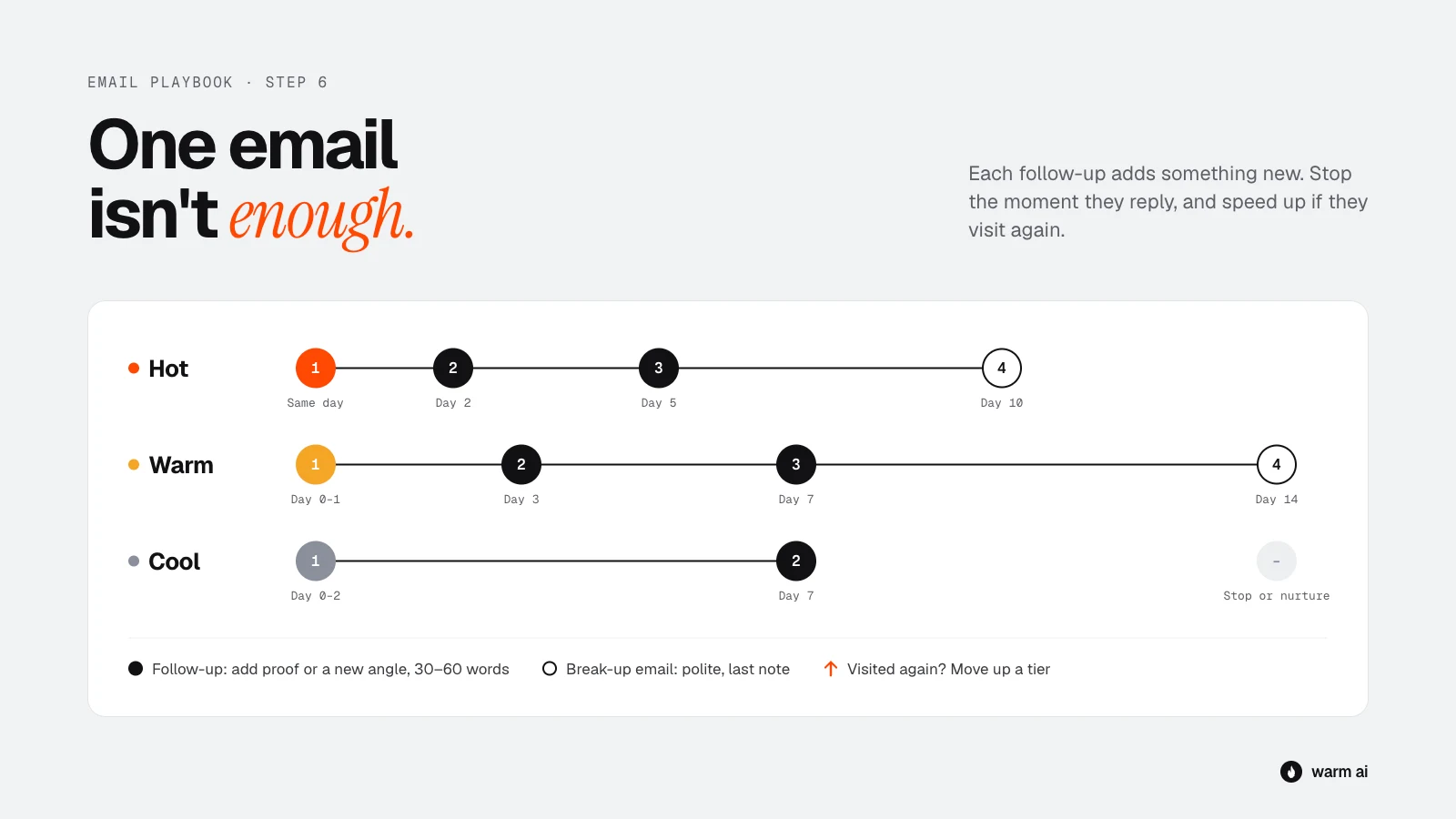
| Group | Email 1 | Email 2 | Email 3 | Email 4 |
|---|---|---|---|---|
| Hot | Same day as the visit | Day 2 | Day 5 | Day 10 (break-up) |
| Warm | Day 0 to 1 | Day 3 | Day 7 | Day 14 (break-up) |
| Cool | Day 0 to 2 | Day 7 | Then stop, or move to a newsletter if they opt in | |
Follow-up rules
- Reply in the same thread so they can see your first email. For the last email, a fresh thread can work well.
- Each follow-up adds something new: a new angle, a new example or a useful resource. Never just "bumping this to the top of your inbox".
- Keep them shorter than the first email: 30 to 60 words.
- Stop the moment they reply, even if the reply is "no".
- If they visit again during the sequence, move them up a group and speed up. A visit mid-sequence is a strong sign they're thinking about it.
Follow-up templates
Follow-up 1: add proof (day 2 to 3)
Hi {{first name}}, one more thing on this. {{Customer}} had the same {{problem}} and {{result}} in {{timeframe}}. Happy to share how they did it if useful.
Follow-up 2: a new angle (day 5 to 7)
Hi {{first name}}, different angle: a lot of {{job title}}s tell us the real cost of {{problem}} isn't {{obvious cost}}, it's {{hidden cost}}. Is that the case at {{company}}?
Follow-up 3: the break-up (day 10 to 14)
Hi {{first name}}, I don't want to keep filling your inbox, so this is my last note. If {{problem}} becomes a priority later, just reply to this and I'll pick it up. Either way, good luck with {{something relevant}}.
The break-up email works because it's polite and takes the pressure off. It often gets a reply ("Actually, can we talk next month?") from people who meant to answer earlier.
Step 7: Handle the replies
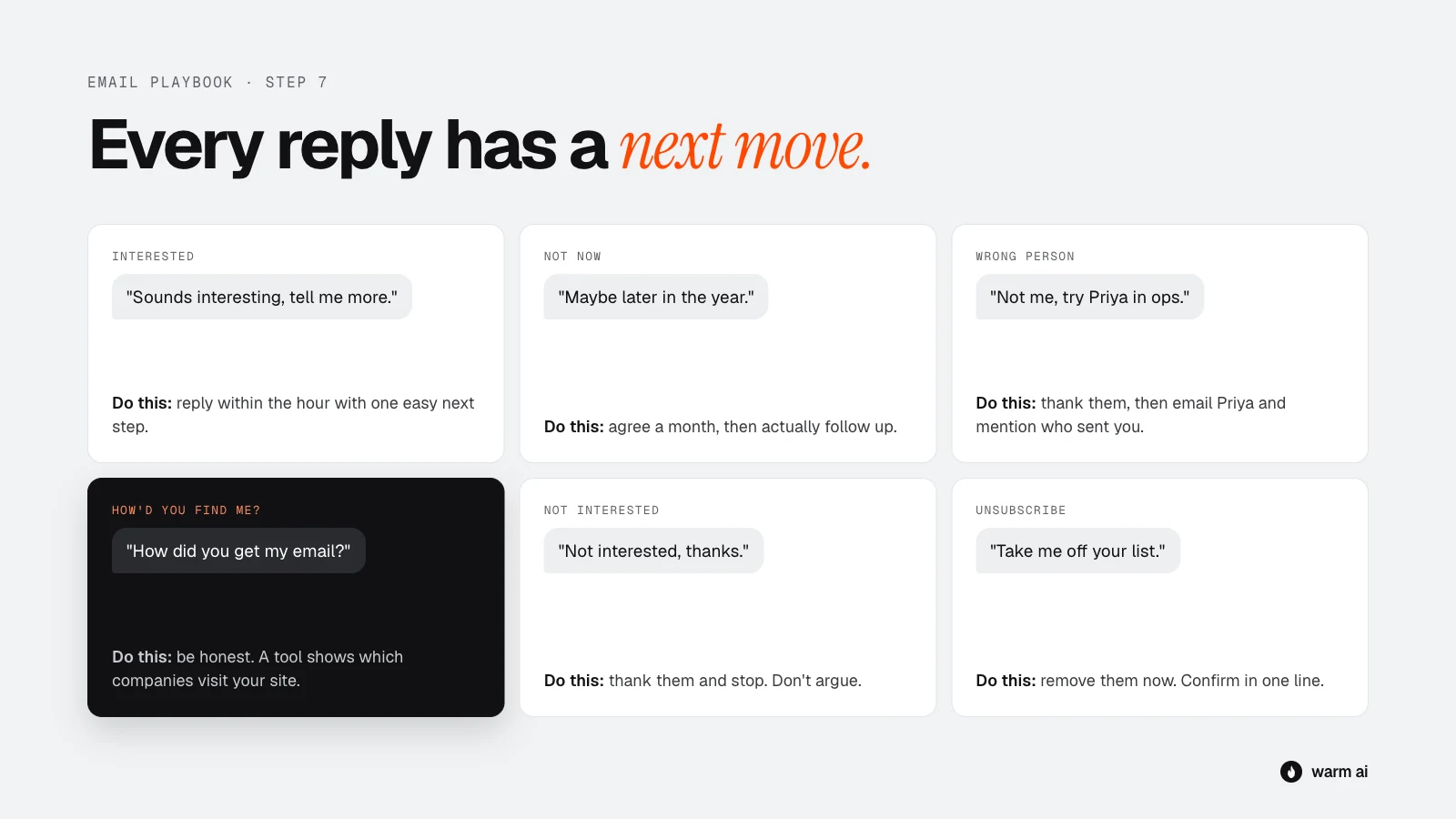
"Yes, interested"
Make the next step as easy as possible, and reply within an hour if you can.
Great, thanks {{first name}}. Here's my calendar for a 15-minute chat: {{link}}. Or send me two times that work and I'll fit around you.
"Not right now"
Respect it, and set a specific reminder.
Totally understand. Would it be OK if I checked back in {{month}}? In the meantime, I'll leave you alone.
Then actually follow up when you said you would. If they come back to your site sooner, Warm AI will show you, so you'll know the timing has changed.
"I'm not the right person, talk to {{name}}"
Thanks {{first name}}, really appreciate it. Mind if I mention you pointed me to {{name}}?
Then email the new person and mention the referral in your first line. It's one of the warmest introductions you can get.
"How did you find me?"
Be honest. Never make up a story.
Fair question. We use a tool that shows us which companies are looking at our website. When a company like {{company}} that fits who we help comes up, I reach out in case it's useful. If it's not relevant, no problem at all, and I won't follow up.
Most people are fine with this answer. What upsets people is feeling tricked.
"Not interested"
Understood, thanks for letting me know {{first name}}. I won't follow up. All the best.
"Unsubscribe" or an angry reply
Remove them straight away, add them to your do-not-contact list, and reply with a short confirmation only:
Done. You won't hear from me again. Sorry for the interruption.
Staying on the right side of the rules
Email laws differ by country, so this isn't legal advice. If you're unsure, check with someone who knows the rules in your market. A few basics apply almost everywhere:
- Only email business addresses, about things relevant to the person's job.
- Always identify yourself and your company honestly.
- Make it easy to opt out, and honour every opt-out immediately and permanently.
- Don't use misleading subject lines.
- Include your company's postal address where your local rules require it, for example under CAN-SPAM in the US.
- In the UK and EU, B2B outreach usually relies on "legitimate interest". The email has to be relevant to the person's role, and you need to tell them how you got their details if they ask.
For more on where the lines sit, see GDPR-compliant website visitor identification.
Common mistakes
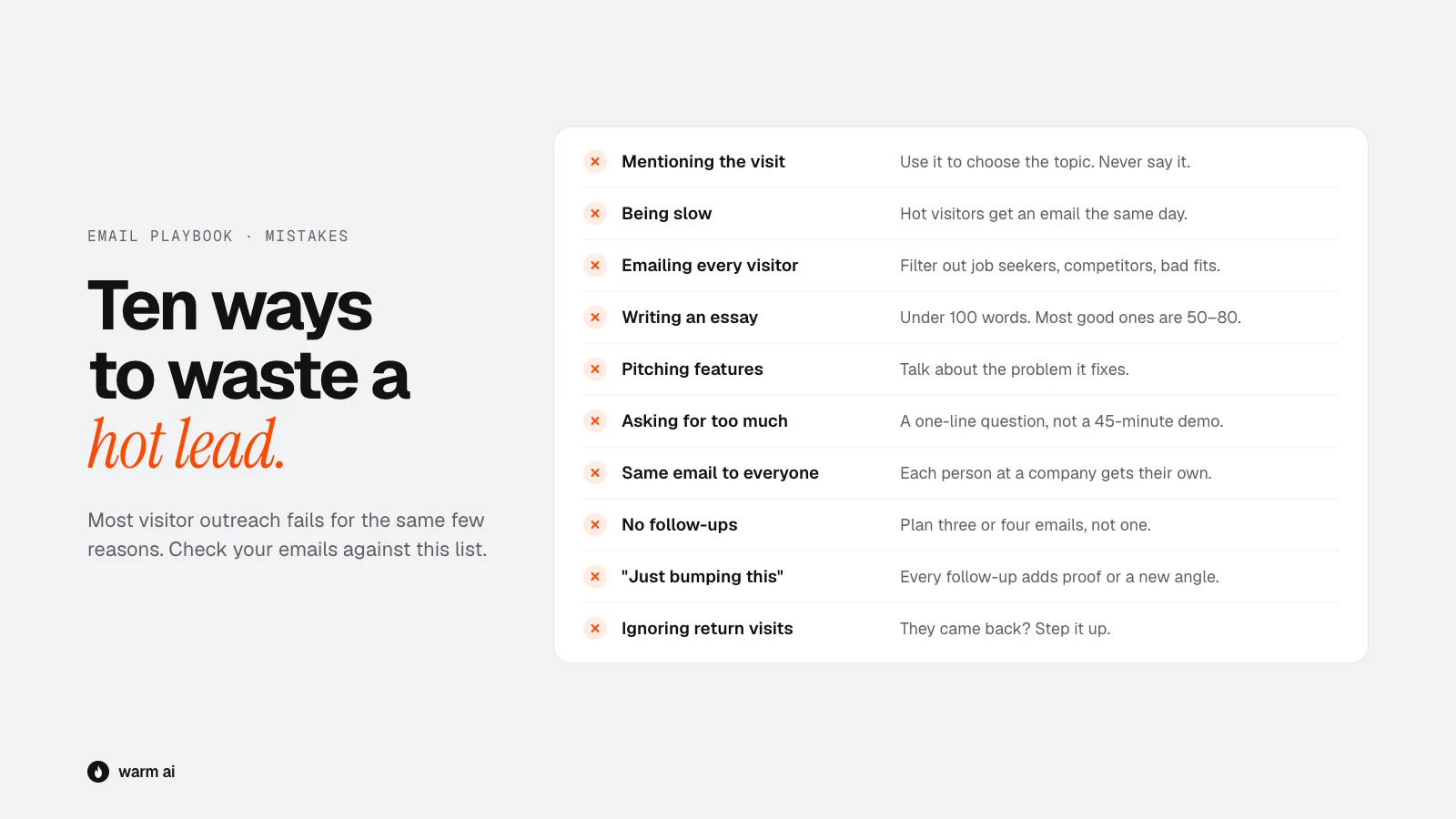
- Mentioning the visit. "I saw you on our website" is the fastest way to get ignored.
- Being slow. A Hot visitor who hears from you a week later has probably cooled off.
- Emailing every visitor. Job seekers, competitors and bad-fit companies waste your time and hurt your sender reputation.
- Writing an essay. Past 100 words, most people stop reading.
- Pitching features instead of solving a problem. They care what it fixes, not what it does.
- Asking for too much, too soon. A 45-minute demo request in the first email is a big ask from a stranger.
- The same email to everyone at a company. It's obvious, and it looks lazy.
- No follow-ups. One email and done leaves most of your replies on the table.
- Follow-ups that add nothing. "Just bumping this" gives them no new reason to reply.
- Ignoring return visits. If someone comes back mid-sequence, that's your cue to step it up.
What good looks like
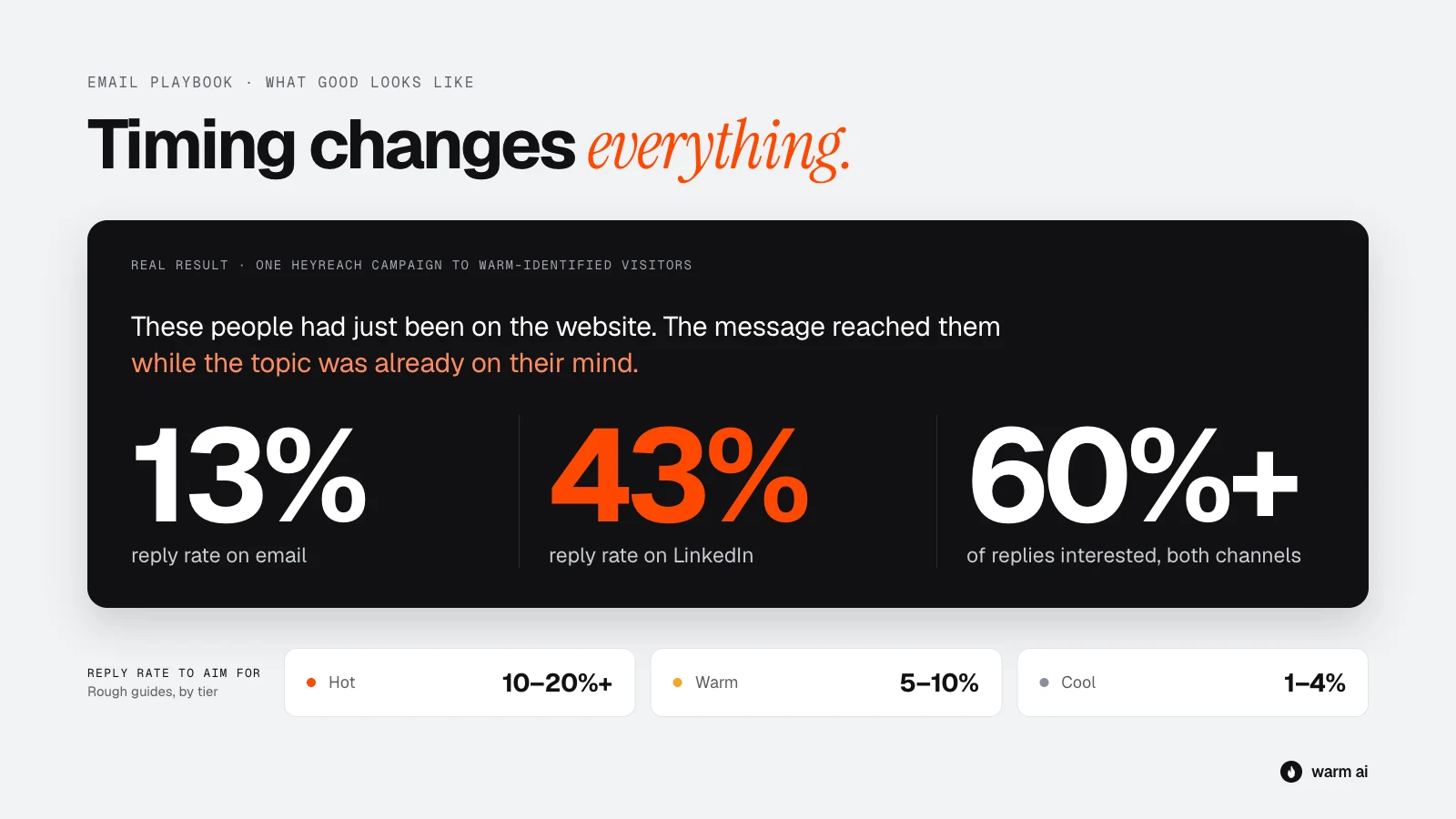
A real example: HeyReach
On a campaign built from Warm AI website visitors, HeyReach saw a 13% reply rate on email and a 43% reply rate on LinkedIn, with 60% or more of replies interested on both channels.
That's one campaign, not an average, but the difference from typical cold email is timing: these people had just been on the website, so the message reached them while the topic was already on their mind. The LinkedIn number is also a good reason to pair email with LinkedIn for Hot visitors. The website visitor LinkedIn playbook shows how.
Rough guides by group
These are rough guides. Results vary a lot by industry, price and how well you target, so compare yourself with your own numbers over time rather than anyone else's.
| What to measure | Hot | Warm | Cool |
|---|---|---|---|
| Reply rate (any reply) | 10 to 20% or more | 5 to 10% | 1 to 4% |
| Positive replies | Half or more of replies | Around a third of replies | Low, and that's fine |
| Time to first email | Same day | Within 48 hours | Within a week |
Signs something's wrong
- Reply rate under 2% across the board: your emails may be landing in spam, or you're emailing the wrong people.
- Plenty of replies, but mostly "not interested": your targeting is off, or your message doesn't match what they looked at.
- Hot visitors replying no better than Cool ones: you're probably sending the same email to everyone. Go back to step 3.
Track results by group and by template. After a month you'll know which templates work best for your business.
Your 15-minute daily routine
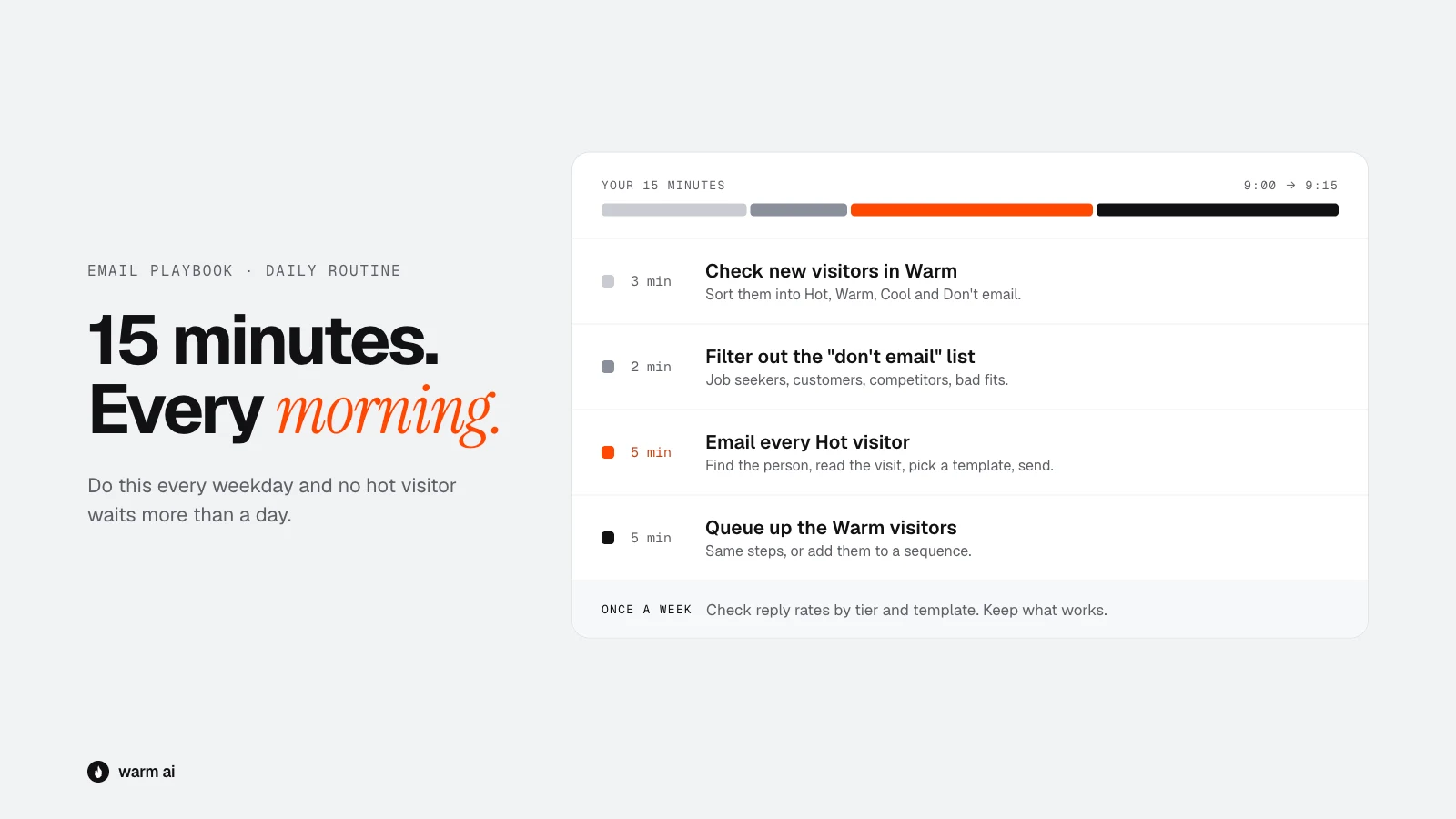
Do this every weekday morning:
- Check new visitors in Warm AI (3 minutes). Sort them into Hot, Warm, Cool and Don't email.
- Filter out the don't-email list (2 minutes). Job seekers, customers, competitors, bad fits.
- Email every Hot visitor (5 minutes). Find the person, read the visit, pick the template, personalise the first line and send.
- Queue up the Warm visitors (5 minutes). Same process, or add them to a sequence that sends over the next day.
Once a week, look at your reply rates by group and template. Keep what works and rewrite what doesn't.
Quick-start checklist
- Sending domain set up with SPF, DKIM and DMARC
- Inboxes warmed up and sending at a safe daily volume
- "Don't email" list written down
- Hot, Warm and Cool rules agreed with your team
- The page-to-angle table filled in for your own website's pages
- Templates customised with your own examples and results
- Follow-up timings set up in your email tool
- Reply scripts saved as snippets
- The daily 15-minute routine in your calendar
Frequently asked questions
Should I tell a website visitor I saw them on my site?
No. Use what they looked at to choose the topic of your email, but don't open by mentioning the visit. If they ask how you found them, tell them honestly.
How soon should I email a website visitor?
For high-intent visits, such as the pricing page or several visits in a week, the same day. For product or case-study visits, within 48 hours. Single blog visits can wait, or go into a nurture list.
How long should a cold email to a website visitor be?
Under 100 words, with one easy question at the end. Most good ones are 50 to 80 words.
How many follow-ups should I send?
Three or four emails in total for Hot and Warm visitors, over 10 to 14 days, with each follow-up adding something new. Stop as soon as they reply.