
The short answer
When someone visits your website, LinkedIn is one of the best places to follow up: on a campaign built from Warm AI website visitors, HeyReach saw a 43% reply rate on LinkedIn against 13% on email. Get your profile ready, find the right person, warm them up by viewing their profile and following them, send a short connection request with no pitch, then start a conversation about what they were looking at, without mentioning the visit. Follow up once or twice, and run email alongside for Hot visitors.
Who this playbook is for
You use Warm to see who's visiting your website. This playbook covers what to do on LinkedIn once you know: who to connect with, what to write in the request, what to send once they accept, when to follow up, and how LinkedIn fits alongside email.
It's written for founders, sales reps and anyone else who does outreach on LinkedIn, whether you do it by hand from your own profile or with a tool like HeyReach or Valley.
What you'll get:
- Why LinkedIn works so well for website visitors
- How to get your profile ready before you send anything
- How to find the right person, including when Warm only shows the company
- How to warm someone up before you connect
- Connection request and first-message templates for eight visitor scenarios
- When to use voice notes, video and InMail
- Follow-up timings, and how to combine LinkedIn with email
- How to automate it with HeyReach or Valley
- The numbers to aim for, the mistakes to avoid and a 15-minute daily routine
Why LinkedIn works for website visitors
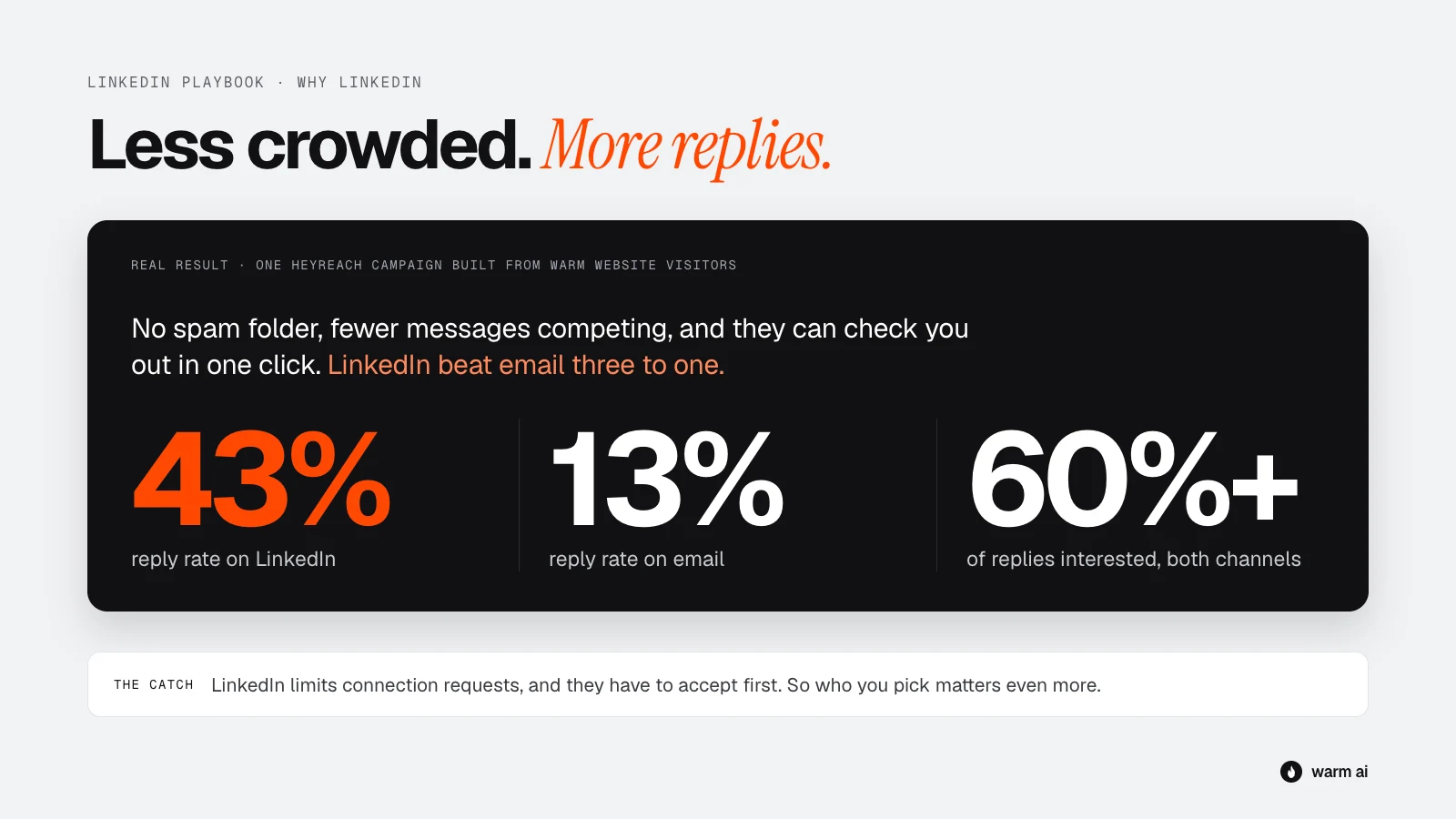
On a campaign built from Warm website visitors, HeyReach saw a 43% reply rate on LinkedIn, against 13% on email, with 60%+ of replies interested on both channels. That was one campaign, not an average, but it shows how well LinkedIn can work when the timing is right.
There are a few reasons LinkedIn does so well with visitors:
- It's less crowded than the inbox. Most people get far more emails than LinkedIn messages, so yours is more likely to be seen.
- They can check you out in one click. Your profile, your company and your mutual connections are right there. A real person with a clear profile is much easier to reply to than an unknown email address.
- It feels more personal. A message from a person, on a platform people use under their own name, feels less like a mass email.
- There's no spam folder. If your request is accepted, your message gets seen.
The catch: LinkedIn limits how many connection requests you can send, and people only see your message if they accept. So you can't reach as many people as on email, and who you choose matters even more.
The golden rule (still applies)
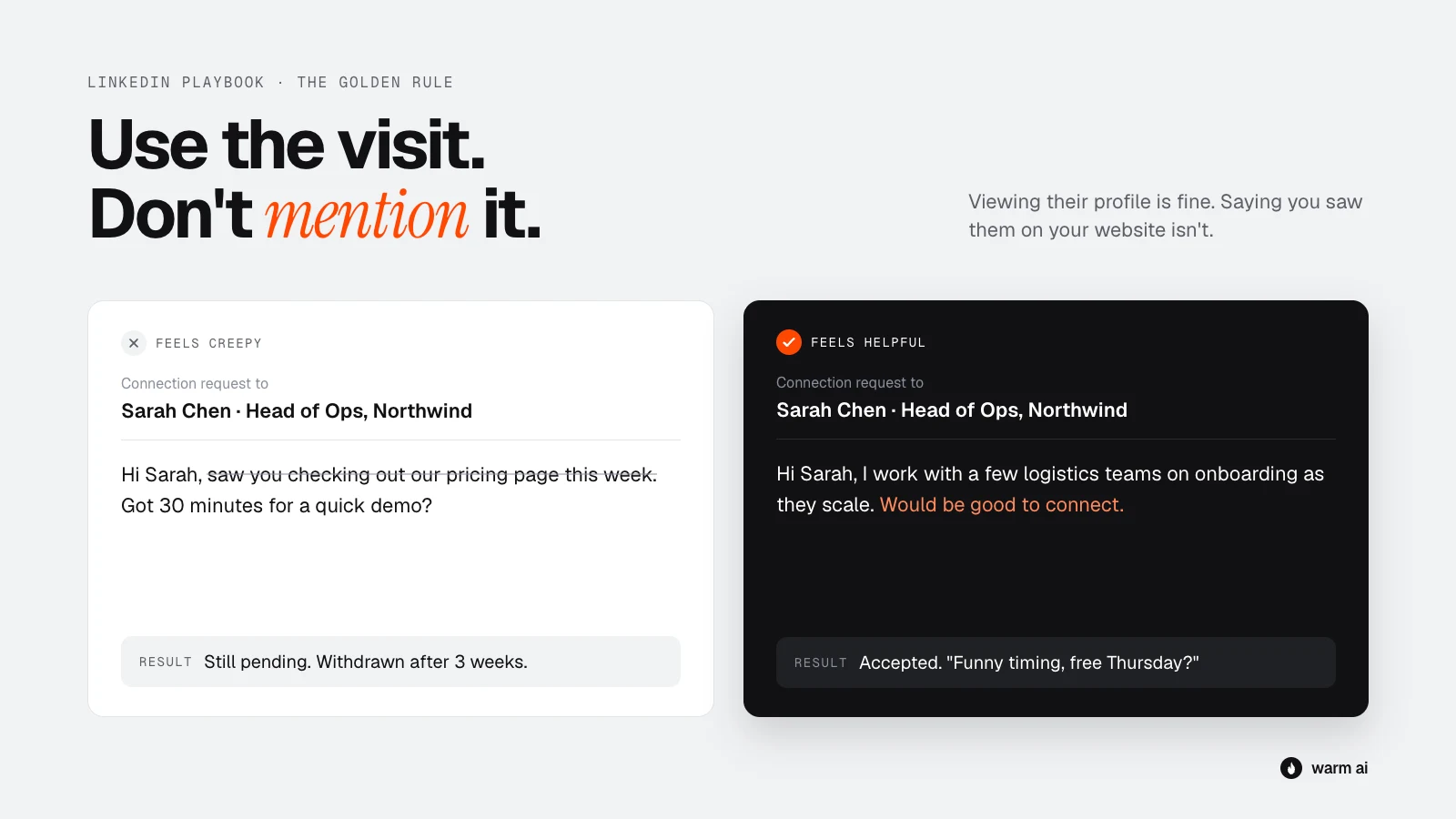
Use the visit, don't mention it. The visit tells you who to contact and what to talk about. It's never the reason you give.
| Don't write | Write instead |
|---|---|
| "Saw you checking out our pricing page " | "Hi Sarah, I work with a few logistics teams on [problem]. Would be good to connect." |
| "Noticed someone from Acme on our site, was it you?" | "Hi Sarah, saw your post on scaling the ops team. Would love to connect." |
| "You've been on our website 4 times this week!" | (Say nothing about it. Just send your best, most relevant message, fast.) |
One LinkedIn exception: viewing someone's profile is normal and expected. They'll often see that you looked, and that's fine. It's a soft, friendly signal, not a creepy one.
If someone asks how you found them, be honest. "We use a tool that shows which companies visit our website. When a company like yours comes up, I reach out in case it's useful." Most people are fine with this. What upsets people is feeling tricked.
Before you start: get your profile ready
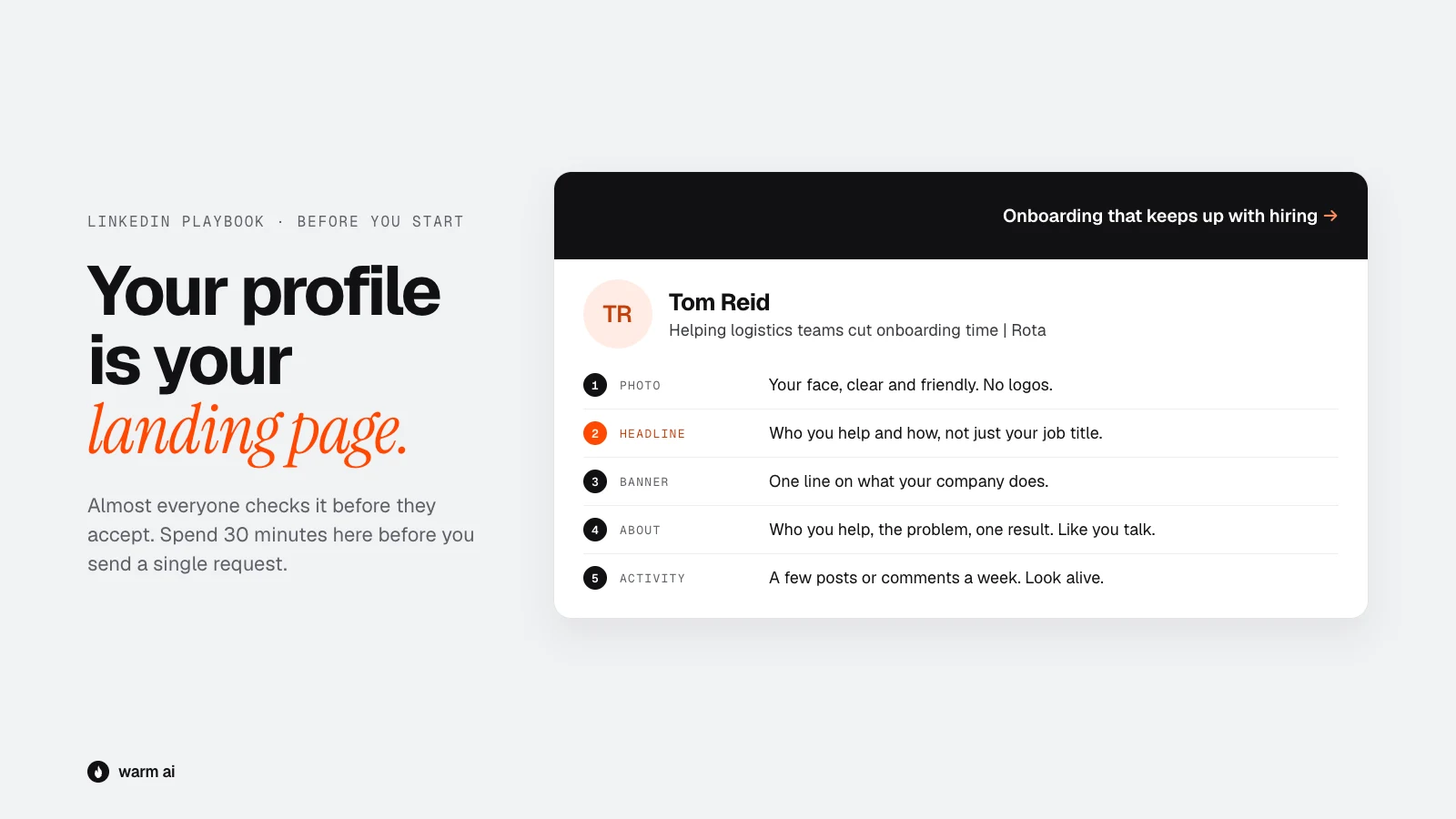
On LinkedIn, your profile is your landing page. Almost everyone checks it before accepting a request. If it looks like a sales robot, they won't accept. Spend 30 minutes on this before you send anything.
Your profile
- Photo: a clear, friendly photo of your face. No logos, no group shots, no sunglasses.
- Headline: say who you help and how, not just your job title.
- Not: "Account Executive at Acme"
- Better: "Helping logistics teams cut onboarding time | Acme"
- Banner: use the space. One line on what your company does, or a simple branded image.
- About section: three or four short paragraphs. Who you help, the problem you solve, one example result, and how to reach you. Write it like you talk.
- Featured section: pin one useful thing, like a case study, a short guide or a demo video.
- Recent activity: if your last post was in 2021, people notice. A few comments or posts a week makes your profile look alive.
Keep your account safe
LinkedIn limits how much outreach one account can do, and it restricts accounts that look automated or spammy. Its user agreement also restricts unauthorised automation, so understand the risk before you use any tool. To stay safe:
- Don't send too many requests. LinkedIn caps how many connection requests you can send per week. The exact number isn't published and changes, so stay well under it: 15–25 a day is a sensible pace for most accounts.
- Warm up new or quiet accounts. If you haven't used LinkedIn much, start with 5–10 requests a day and build up over a few weeks.
- Keep your acceptance rate healthy. Lots of ignored requests is a warning sign to LinkedIn. That's another reason to only contact people who are a good fit.
- Withdraw old requests. Requests still pending after 2–3 weeks are unlikely to be accepted. Withdraw them to keep your account tidy.
- If you use a tool, use one built for LinkedIn safety that keeps you within limits and spreads activity through the day. See "Automating with HeyReach or Valley" below.
Step 1: Sort your visitors by interest
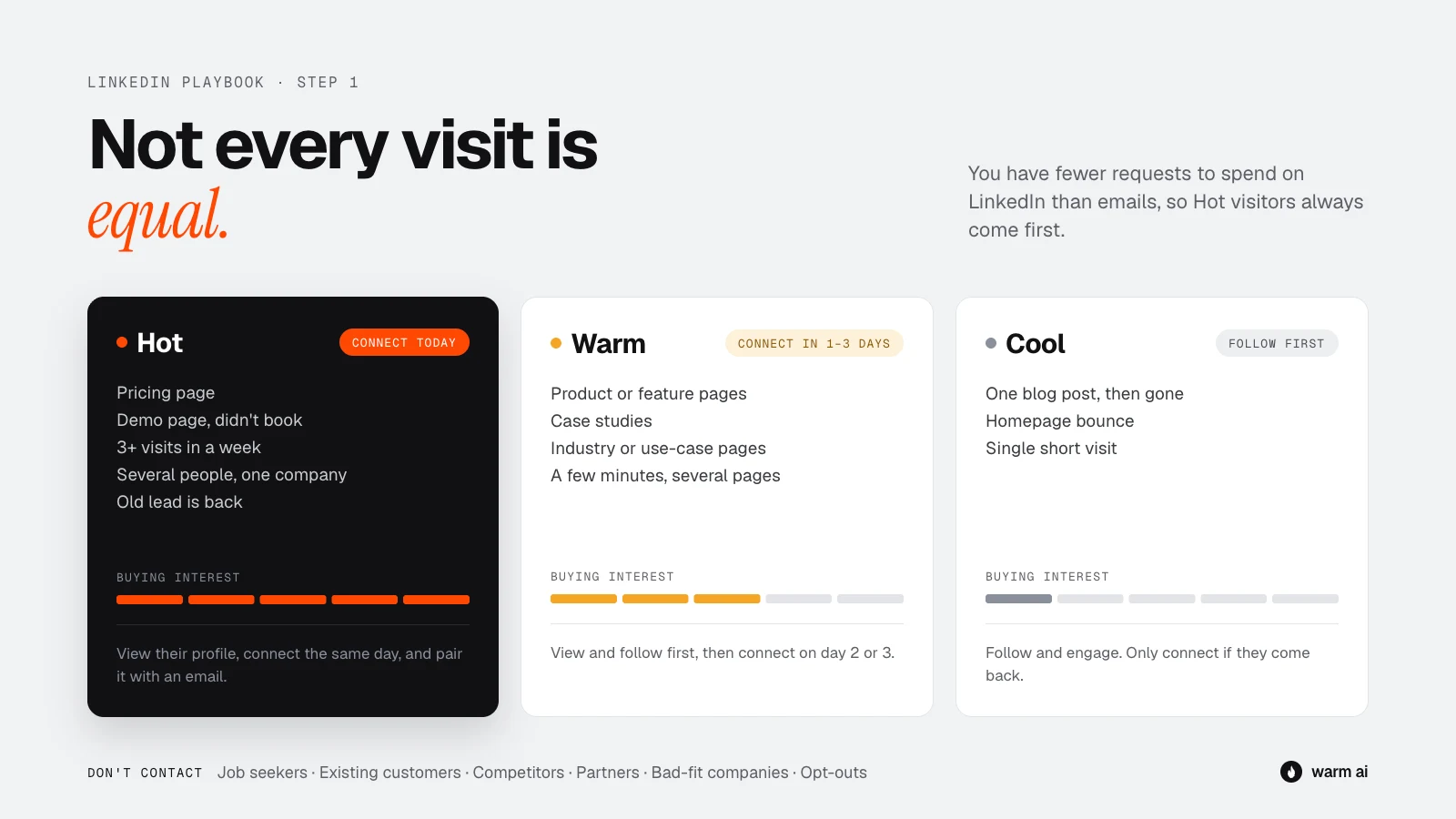
Use the same three groups as the email playbook. On LinkedIn the stakes are higher, because you have fewer requests to spend, so Hot visitors get priority.
| Group | Signals | What to do on LinkedIn |
|---|---|---|
| Hot | Pricing page, demo page without booking, 3+ visits in a week, several people from one company, old lead is back | Connect today. Short warm-up (view profile), then send the request. Pair with email. |
| Warm | Product or feature pages, case studies, industry pages, several pages in one visit | Warm up over 1–2 days (view, follow, engage), then connect. |
| Cool | One blog post, homepage bounce, single short visit | Only if they're a great fit. Follow them and engage with their posts first. Connect later if they come back. |
Don't contact at all: job seekers, existing customers (they need their account manager), competitors, partners and suppliers you already know, your own team, bad-fit companies, and anyone who's asked not to be contacted.
One LinkedIn bonus check: are you already connected, or do you share mutual connections? If you're already connected, skip the request and go straight to a message. If you share a connection who knows them well, consider asking for an intro instead.
Step 2: Find the right person on LinkedIn
When Warm names the person
For US visitors, Warm can often tell you who visited, with their name, job title and LinkedIn profile. Before you connect, check:
- Are they the right person? Someone junior researching tools for their boss is useful to know about, but probably isn't the buyer. Connect with them and the decision-maker.
- Are they active on LinkedIn? Look at their activity. If they haven't posted, commented or updated anything in a year, they may not see your message. Email might be the better channel for them.
- Do they still work there? Check the dates on their current role.
When you only know the company
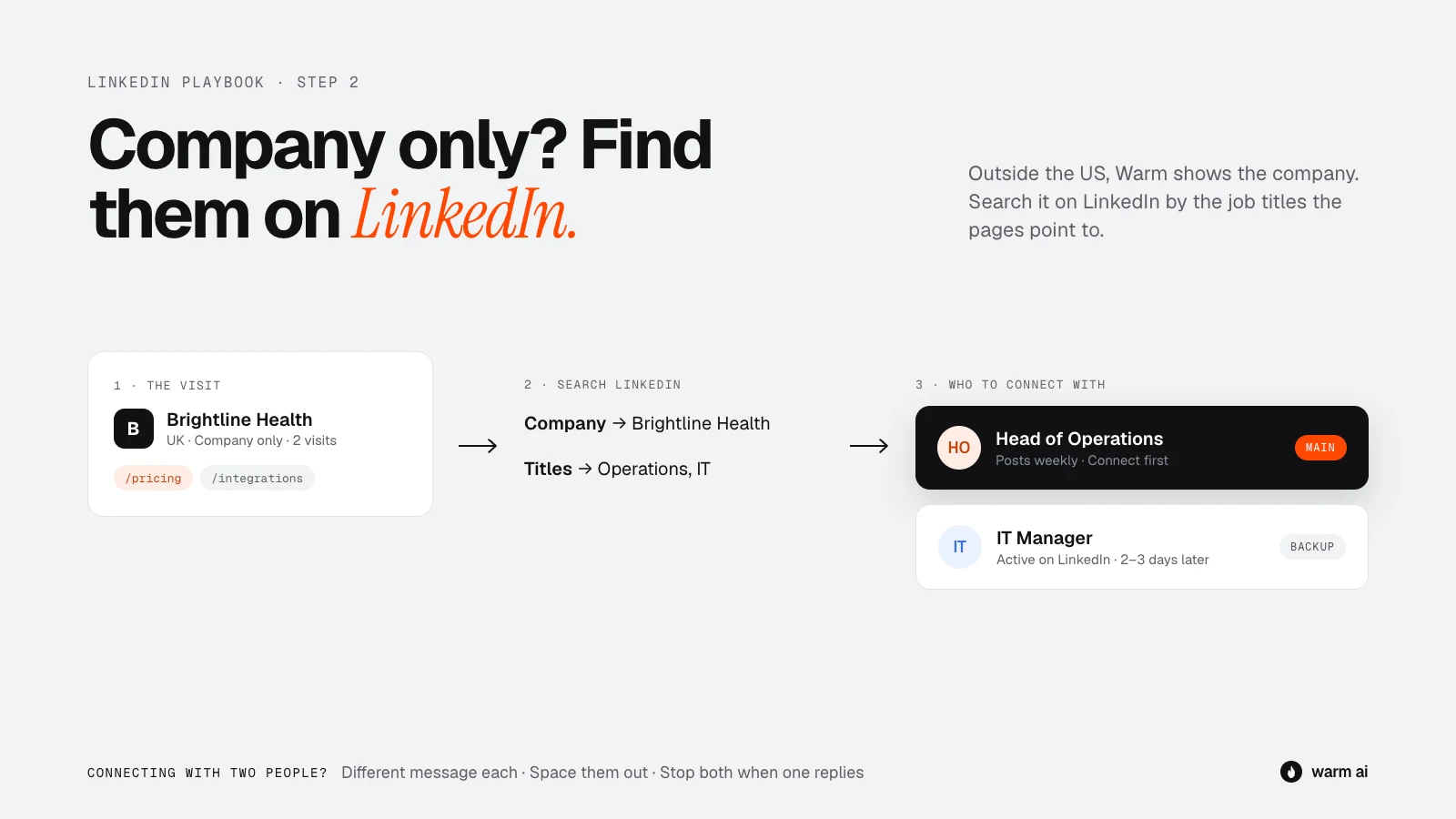
For UK, EU and other non-US visitors, Warm shows you the company, not the person. LinkedIn is the best place to fill that gap:
- Search the company on LinkedIn (or Sales Navigator, if you have it) and filter by job title.
- Use the pages they visited to choose who to look for:
| Pages they visited | Who to look for |
|---|---|
| Pricing, plans, billing | Founder, head of department, finance or operations lead |
| Technical docs, integrations, API, security | Engineering lead, IT manager, CTO |
| Features, product tour | The team lead who'd use it day to day |
| Case studies for their industry | Head of the department your product serves |
| Comparison pages | Whoever owns the tool you're being compared to |
- Pick one main person and one backup. The main person is the likely decision-maker. The backup is someone who'd use the product.
- Prefer people who are active on LinkedIn. Between two similar people, choose the one who posts or comments.
Contacting more than one person
For Hot companies, it's worth connecting with two or three people, but:
- Write a different message for each person. The finance lead cares about cost; the team lead cares about saving time.
- Space them out by 2–3 days. Five requests from the same stranger landing on one team on the same morning looks like a campaign.
- Stop everyone the moment anyone at that company replies.
Step 3: Warm them up before you connect
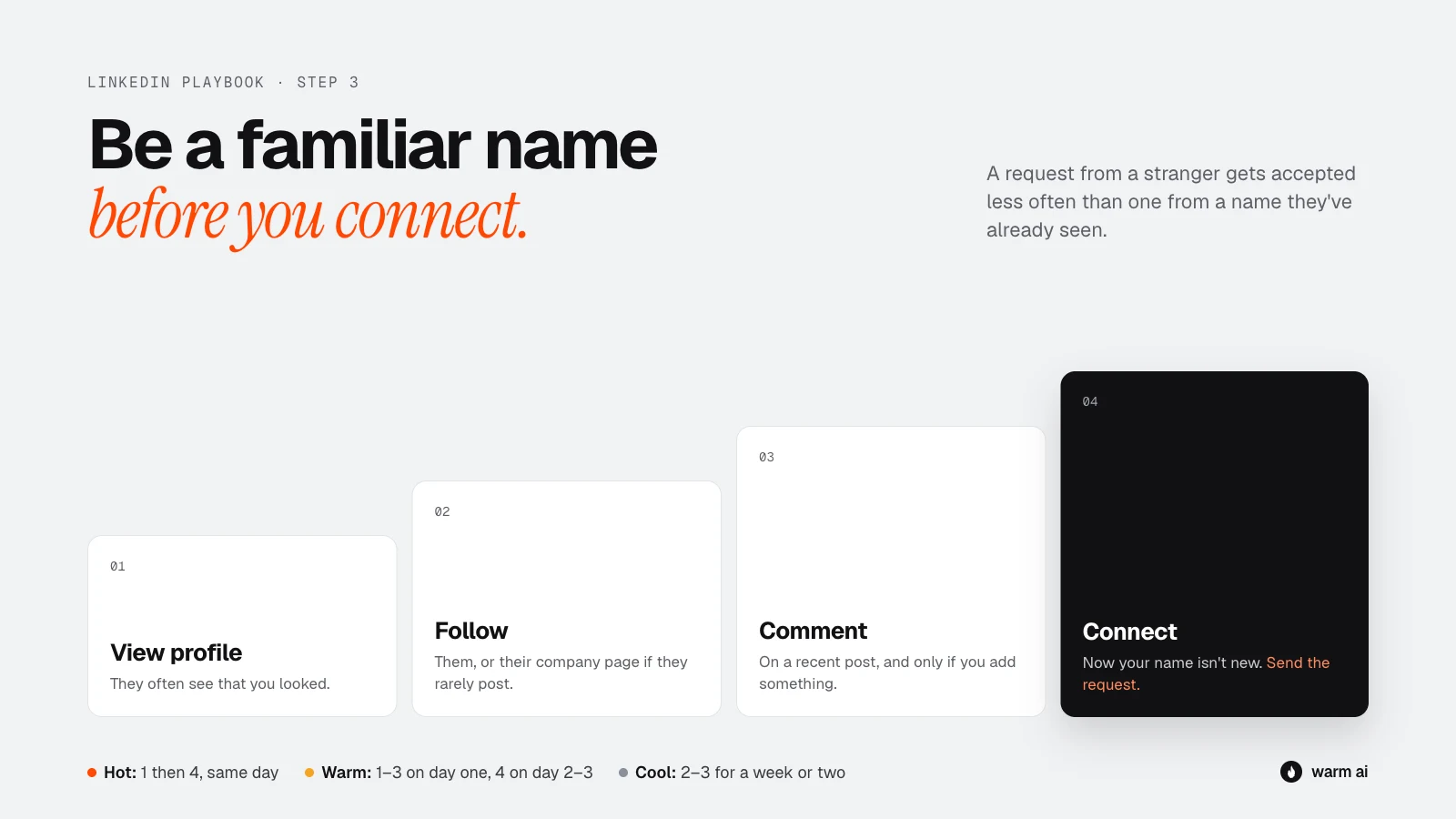
A request from a complete stranger gets accepted less often than one from someone whose name they've seen before. A light warm-up makes a real difference, and it only takes a minute.
The warm-up, in order:
- View their profile. They'll often get a notification that you looked. It puts your name and face in front of them.
- Follow them (or their company page, if they don't post much).
- Engage with a recent post, if they have one. A thoughtful comment that adds something, not "Great post! 🔥". If they haven't posted recently, skip this step. Don't dig up a post from two years ago.
- Then send your connection request.
How long to spend warming up:
- Hot: view their profile, then send the request the same day. Speed matters more than warm-up.
- Warm: view and follow on day one, comment if there's something worth commenting on, connect on day two or three.
- Cool: follow and engage over a week or two. Only connect if they come back to your site or reply to something.
Step 4: The connection request
Note or no note?
You can send a request with a short note, or with no note at all. Both work, for different reasons:
| With a note | Without a note | |
|---|---|---|
| Good for | Hot visitors, when you have a clear, relevant reason | When your profile does the talking, or when you're near your note limit |
| Upside | Gives them a reason to accept | Feels less like a pitch, and some people accept blank requests more readily |
| Watch out | A salesy note gets ignored | Easy to forget why you connected. Your first message has to do the work |
Our recommendation: use a short note for Hot visitors and anyone you have a genuine reason to connect with. Test no-note requests for Warm visitors and compare your acceptance rates.
Connection note rules
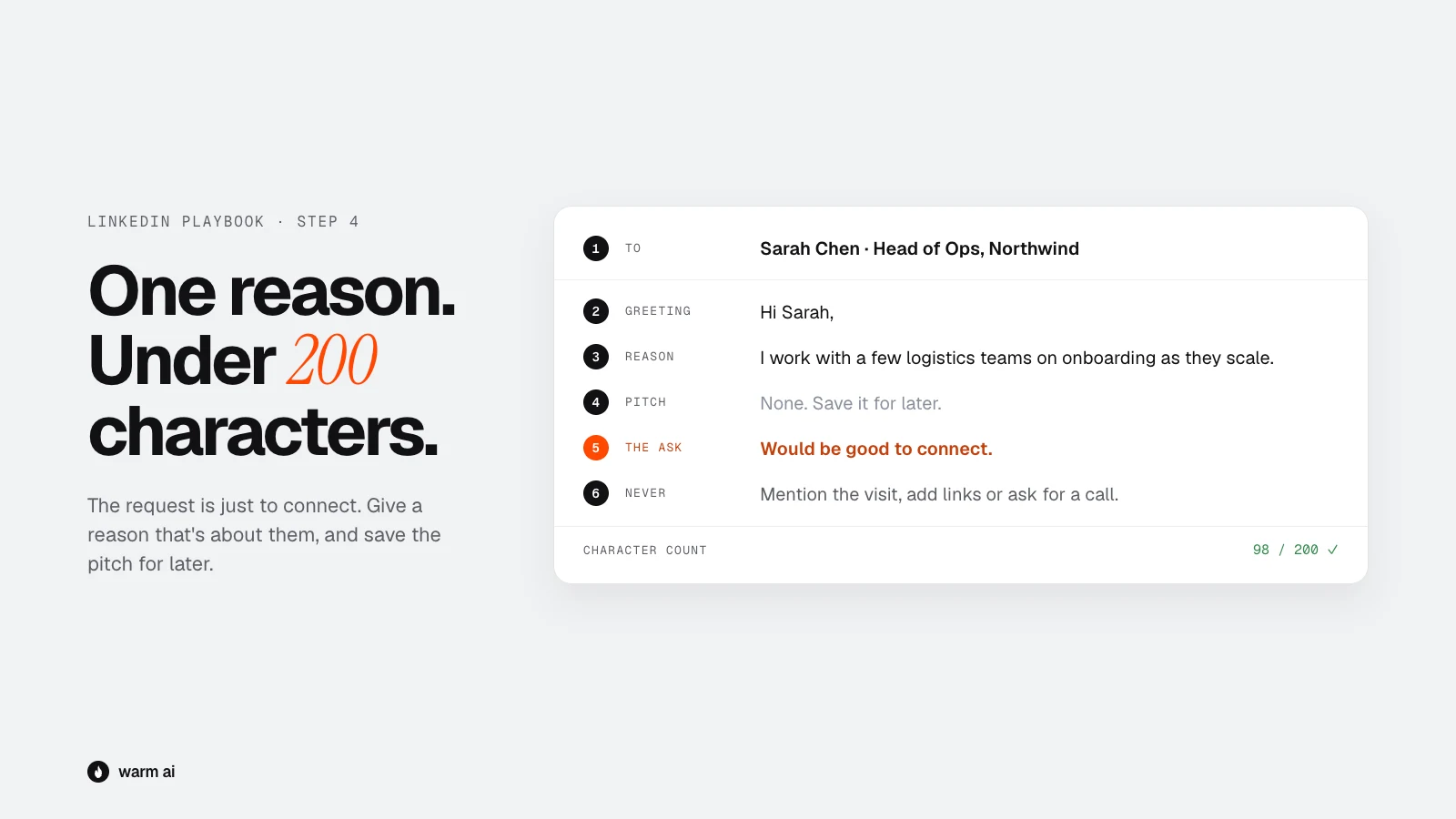
- Under 200 characters. Shorter than you think. One or two sentences.
- No pitch. The request is just to connect. Save the "here's what we do" for later, and keep it light even then.
- Give a reason that's about them. Their role, their industry, a post they wrote, a shared connection or group.
- Never mention the visit.
- No links.
Connection note templates
Anything in {{double brackets}} needs filling in.
A. Same industry
Hi {{first name}}, I work with a few {{industry}} teams on {{problem area}}. Would be good to connect.
B. Their post
Hi {{first name}}, enjoyed your post on {{topic}}, especially the bit about {{specific point}}. Would love to connect.
C. Their role
Hi {{first name}}, I spend most of my time talking to {{job title}}s about {{problem area}}. Always keen to connect with people doing it well.
D. Mutual connection
Hi {{first name}}, I see we both know {{mutual name}}. I work on {{problem area}} with teams like {{company}}. Would be good to connect.
E. Company news (public only)
Hi {{first name}}, congrats on {{funding round / new office / launch}}. I work with a few teams going through the same growth. Would be good to connect.
Step 5: The first message after they accept
When someone accepts, send your first message within a day. This is where most LinkedIn outreach goes wrong: the second someone accepts, they get a wall of text and a calendar link. That's the "pitch slap", and it's the fastest way to get ignored.
First message rules
- Keep it short. 2–4 sentences. LinkedIn messages are read on phones.
- Thank them, briefly, or skip it. Don't make a big deal of the connection.
- One problem, tied to what they looked at on your site. (Without saying they looked.)
- End with an easy question, not a meeting request.
- No links, no attachments, no calendar link in the first message.
- Sound like a person. No "I hope this message finds you well."
Reading the visit for LinkedIn
The pages they visited tell you what to talk about, just like email:
| What they looked at | What to talk about |
|---|---|
| Pricing | Cost and value for a team like theirs |
| Demo page, didn't book | Offer something lighter than a call: a short video or a quick answer here |
| A specific feature | The problem that feature solves |
| Case studies | A result from a similar company |
| Industry page | Their industry's specific challenges |
| Comparison page | Honest differences, never trashing the competitor |
| Integrations | Whether it fits the tools they use |
| Blog post | More on the topic they were reading about |
First message templates
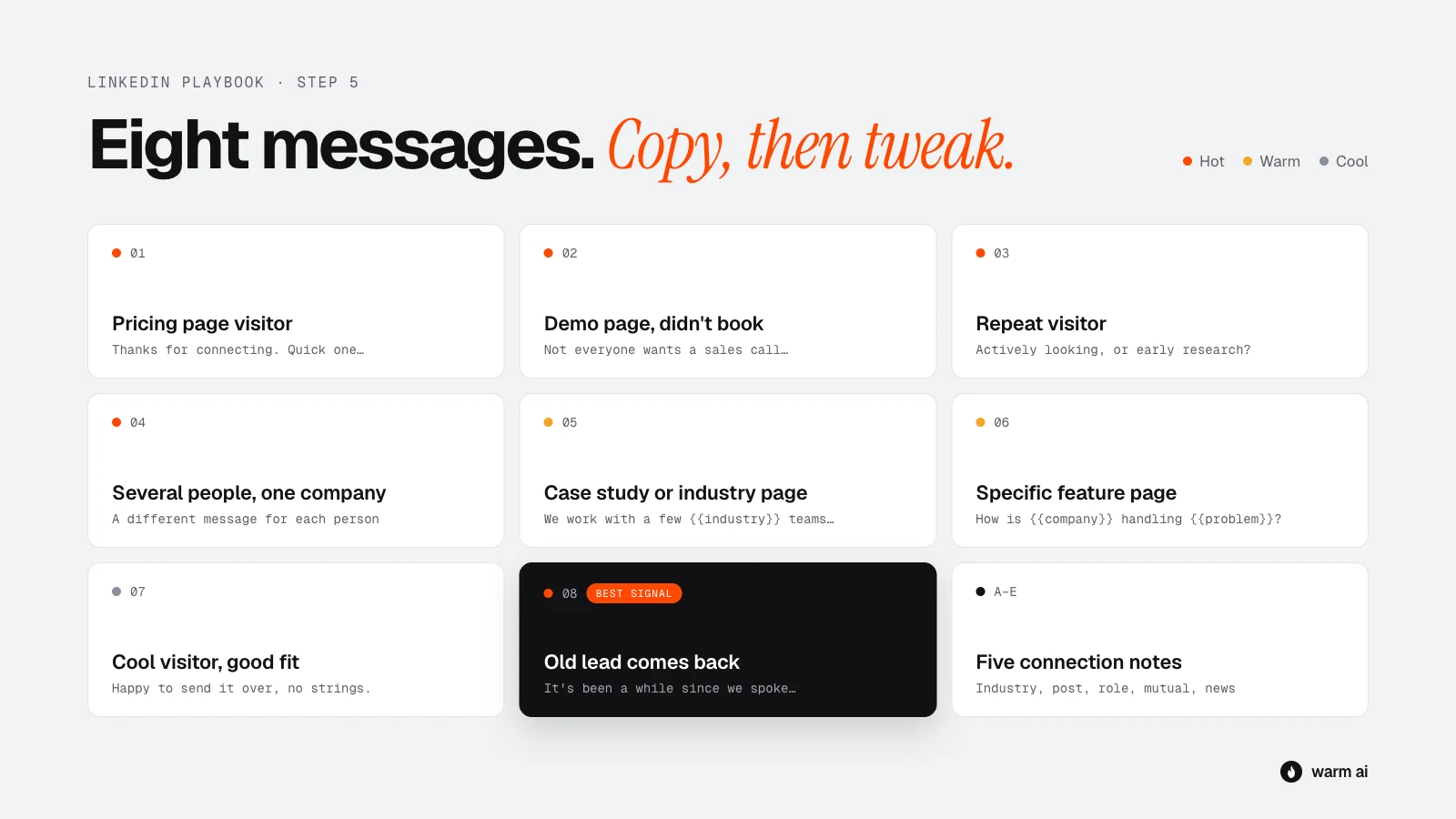
Template 1: Pricing page visitor (Hot)
Thanks for connecting, {{first name}}. Quick one: when {{type of company}} teams look at {{problem area}}, the first question is usually what it costs and what they'd get back. Happy to share how that works for a team your size if it's useful?
Why it works: it answers the question they were already asking, without saying you saw them asking it.
Template 2: Demo page, didn't book (Hot)
Thanks for connecting, {{first name}}. Not everyone wants a sales call just to see if something's a fit, fair enough. If it helps, I can send a 2-minute video of how {{company type}} teams use {{product}}. Want it?
Why it works: they were close to booking but something stopped them. This removes the pressure.
Template 3: Repeat visitor (Hot)
Good to connect, {{first name}}. Curious, is {{problem area}} something {{company}} is actively looking at right now, or more on the radar for later? Either way, happy to share what we're seeing from other {{industry}} teams.
Why it works: repeat visits usually mean active evaluation. The question is easy to answer either way.
Template 4: Several people from one company (Hot)
To the decision-maker:
Thanks for connecting, {{first name}}. {{Problem area}} seems to come up a lot for teams growing past {{size}}. The leaders I speak to mostly care about {{outcome for a leader}}. Is that on the agenda at {{company}} this quarter?
To the day-to-day user (2–3 days later):
Thanks for connecting, {{first name}}. How are you handling {{specific task}} at the moment? Most {{job title}}s I talk to are still doing it {{the painful way}}.
Why it works: each person gets a message about what they care about.
Template 5: Case study or industry page (Warm)
Thanks for connecting, {{first name}}. We work with a few {{industry}} teams like {{similar customer}}, and {{problem}} comes up again and again. {{Similar customer}} went from {{before}} to {{after}}. Is that something you deal with too?
Why it works: they were looking for proof you work for companies like theirs.
Template 6: Specific feature page (Warm)
Good to connect, {{first name}}. Quick question: how is {{company}} handling {{problem the feature solves}} today? Most teams I talk to are {{common approach}}, which works until {{when it breaks}}.
Why it works: it opens a conversation about their problem, not a pitch about your feature.
Template 7: Cool visitor, good fit (Cool)
Thanks for connecting, {{first name}}. I put together {{a useful resource}} on {{blog topic}} for {{type of company}}. Happy to send it over if it's useful, no strings.
Why it works: they were curious about a topic, so you offer more of the same, with no sales pressure.
Template 8: Old lead comes back (Hot)
You may already be connected. If so, skip the request and message them directly.
Hi {{first name}}, it's been a while since we spoke about {{topic}}. Hope things are going well at {{company}}. A few things have changed on our side since then, including {{relevant update}}, which I remember was a sticking point. Worth picking the conversation back up?
Why it works: they already know you, and mentioning what's changed answers the reason they didn't buy before.
Step 6: Voice notes, video and InMail
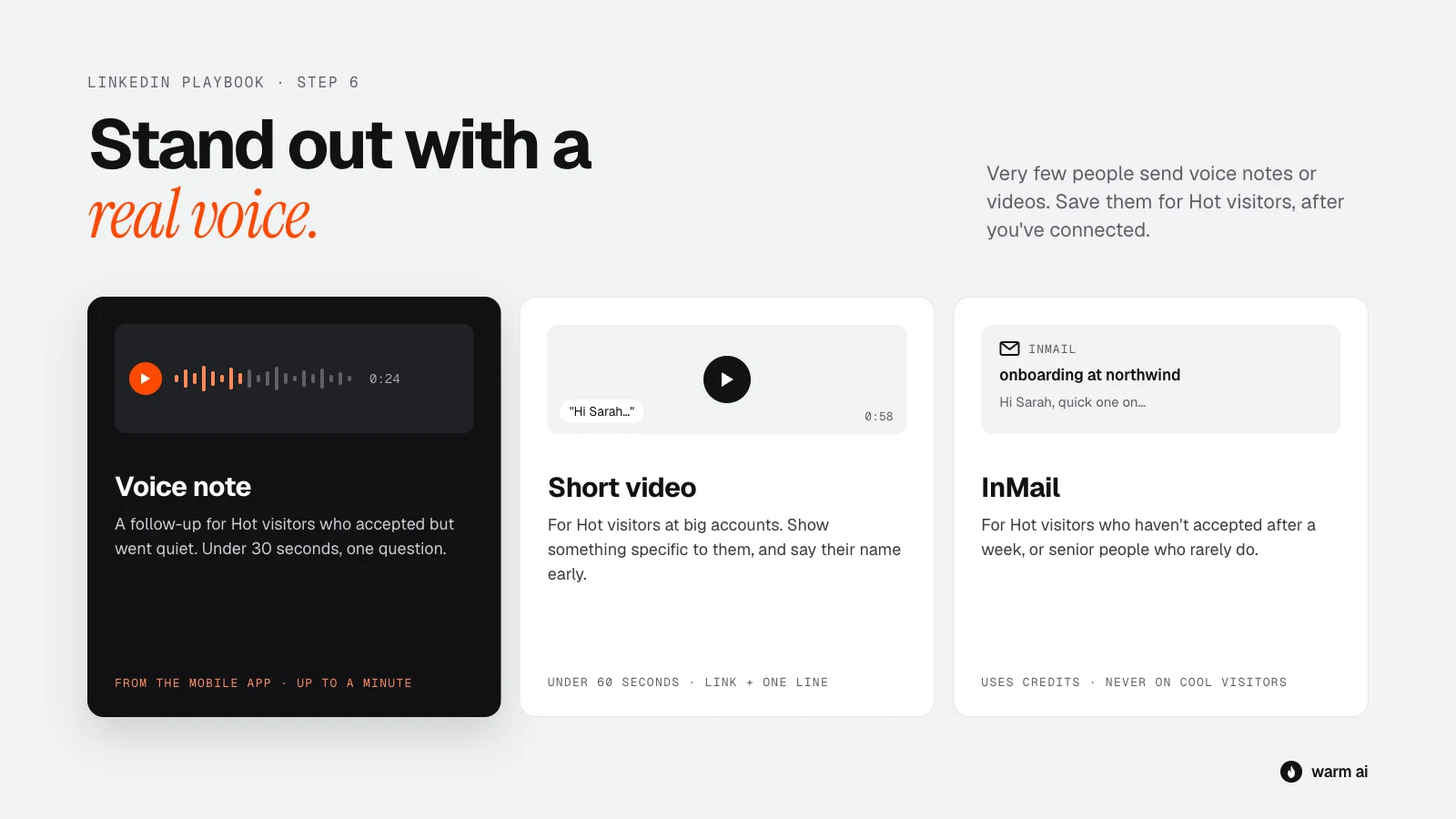
Voice notes
LinkedIn lets you send voice messages of up to a minute from the mobile app. Very few people send them, so they stand out.
- When to use them: as a follow-up for Hot visitors who accepted but haven't replied. Not as the first message to someone who doesn't know you yet.
- Keep it under 30 seconds. Say who you are, why you're getting in touch, and ask one question.
- Sound natural. Don't read a script word for word. A quick, friendly voice beats a polished one.
- Example: "Hi Sarah, it's Tom from Acme. Thanks for connecting. I work with a few logistics teams on onboarding, and I'd love to hear how you're handling it as you grow. No pressure at all, just reply here if it's worth a chat. Cheers."
Short videos
A 60-second personal video (recorded with a tool like Loom) can work well for Hot visitors at high-value accounts.
- Show something specific to them, like their website, a quick idea for their team, or how a similar company uses your product.
- Send the link in a message with one line of context. Don't send it cold as a first message.
- Say their name in the first five seconds. It proves it's not a mass video.
InMail
InMail lets you message someone you're not connected to. It needs Premium or Sales Navigator credits, though some people have "Open Profiles" that anyone can message for free.
- When to use it: for Hot visitors who haven't accepted your request after a week, or senior people who rarely accept requests from strangers.
- Write it like a short email: a clear subject line, 3–5 sentences, one easy question.
- Don't burn credits on Cool visitors.
Step 7: Follow up
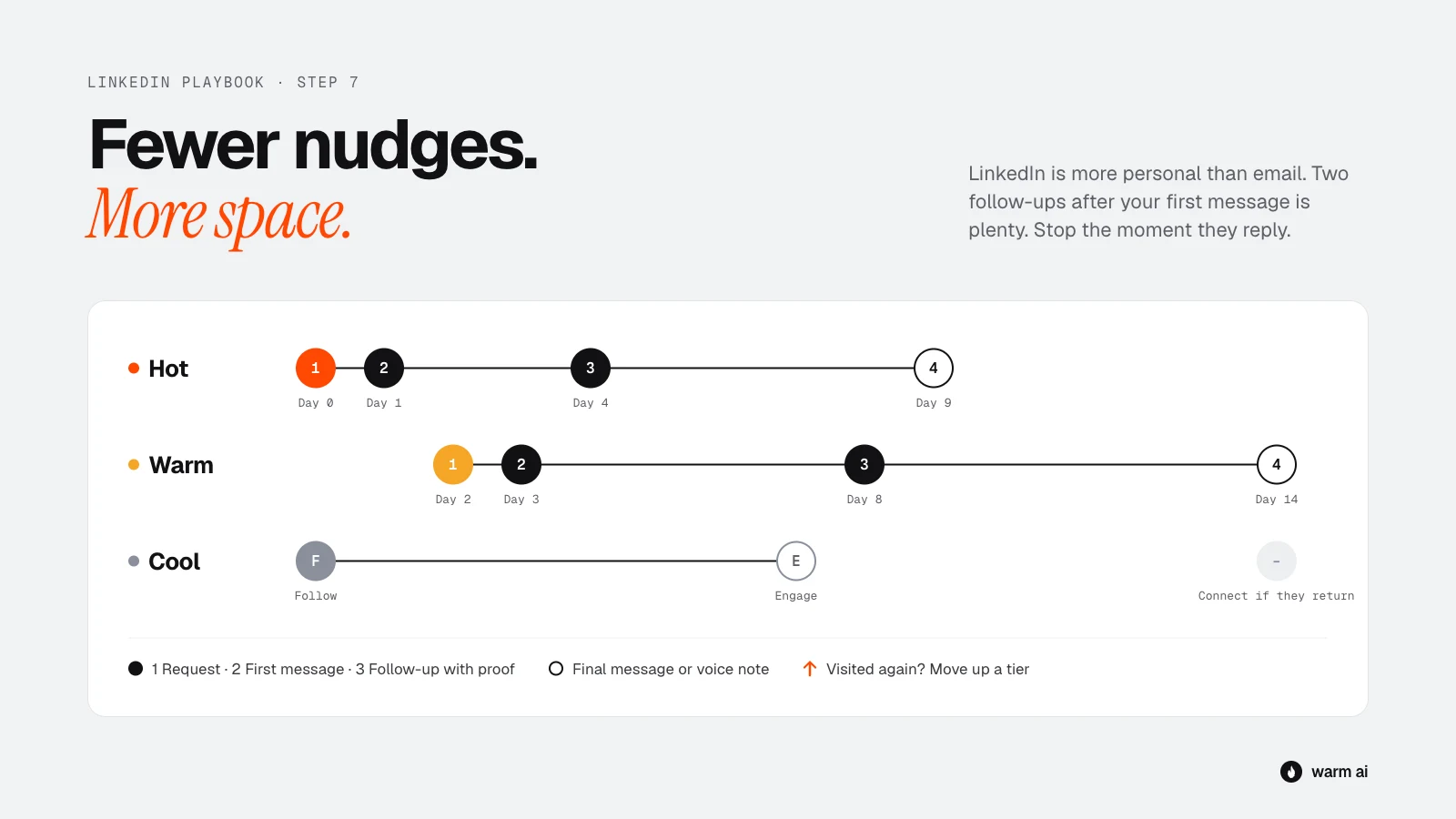
Plenty of LinkedIn replies come after a nudge, but LinkedIn is a more personal space than email, so fewer, more spaced-out follow-ups work better.
Timing
| Group | Day 0 | After they accept | Follow-up 1 | Follow-up 2 |
|---|---|---|---|---|
| Hot | View profile + send request (+ email) | First message within a day | 3 days later: add proof | 5–7 days later: voice note or final message |
| Warm | View + follow | Request on day 2–3, first message within a day of accepting | 5 days later: new angle | 7–10 days later: final message |
| Cool | Follow + engage | Only connect if they come back | Light touch only | Stop |
Follow-up rules
- Two follow-ups after your first message is plenty. Three at most for Hot visitors.
- Each one adds something new: proof, a new angle, a voice note, a useful resource.
- Keep them shorter than the first message.
- Stop the moment they reply.
- Keep engaging with their posts in between, if they post. It keeps your name in front of them without another message.
- If they visit your website again mid-sequence, move them up a group and speed up.
- If they never accept, withdraw the request after 2–3 weeks and try email instead.
Follow-up templates
Follow-up 1: add proof
{{First name}}, one more thing on this. {{Customer}} had the same {{problem}} and {{result}} in {{timeframe}}. Happy to share how they did it.
Follow-up 2: the final message
{{First name}}, I won't keep nudging. If {{problem}} becomes a priority later, just drop me a message here. Either way, good luck with {{something relevant}}.
Step 8: LinkedIn + email together
LinkedIn and email work best together, especially for Hot visitors. People who ignore one channel often reply on the other. The rule: two channels, one conversation. Never send the same message on both.
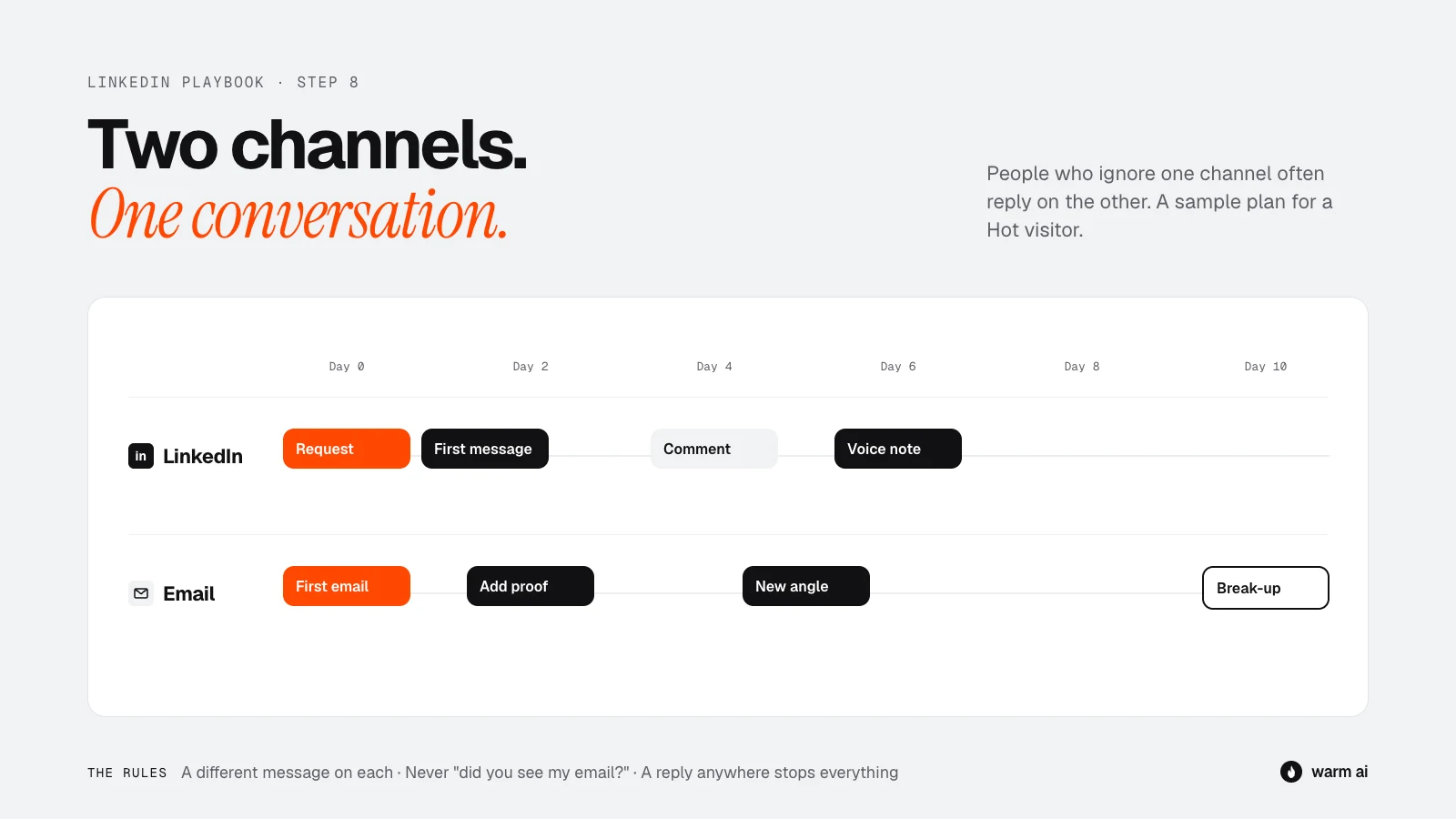
A sample Hot visitor sequence
| Day | Channel | What happens |
|---|---|---|
| 0 | View profile, send connection request with a short note | |
| 0 | First email (see the email playbook, templates 1–4) | |
| 1–2 | They accept: send first message (different angle from the email) | |
| 2 | Follow-up 1: add proof | |
| 4 | Engage with their latest post, if they have one | |
| 5 | Follow-up 2: new angle | |
| 6 | Voice note | |
| 10 | Break-up email |
Rules for combining channels
- Different message on each channel. If your email is about cost, make your LinkedIn message about a customer result.
- Never say "Did you see my email?" on LinkedIn. It's nagging.
- Reply on whichever channel they choose. If they reply on LinkedIn, stop the email sequence, and the other way round.
- One conversation at a time. Once they reply anywhere, everything else stops.
Step 9: Handle the replies
Replies on LinkedIn are usually shorter and more casual than on email. Match their tone.
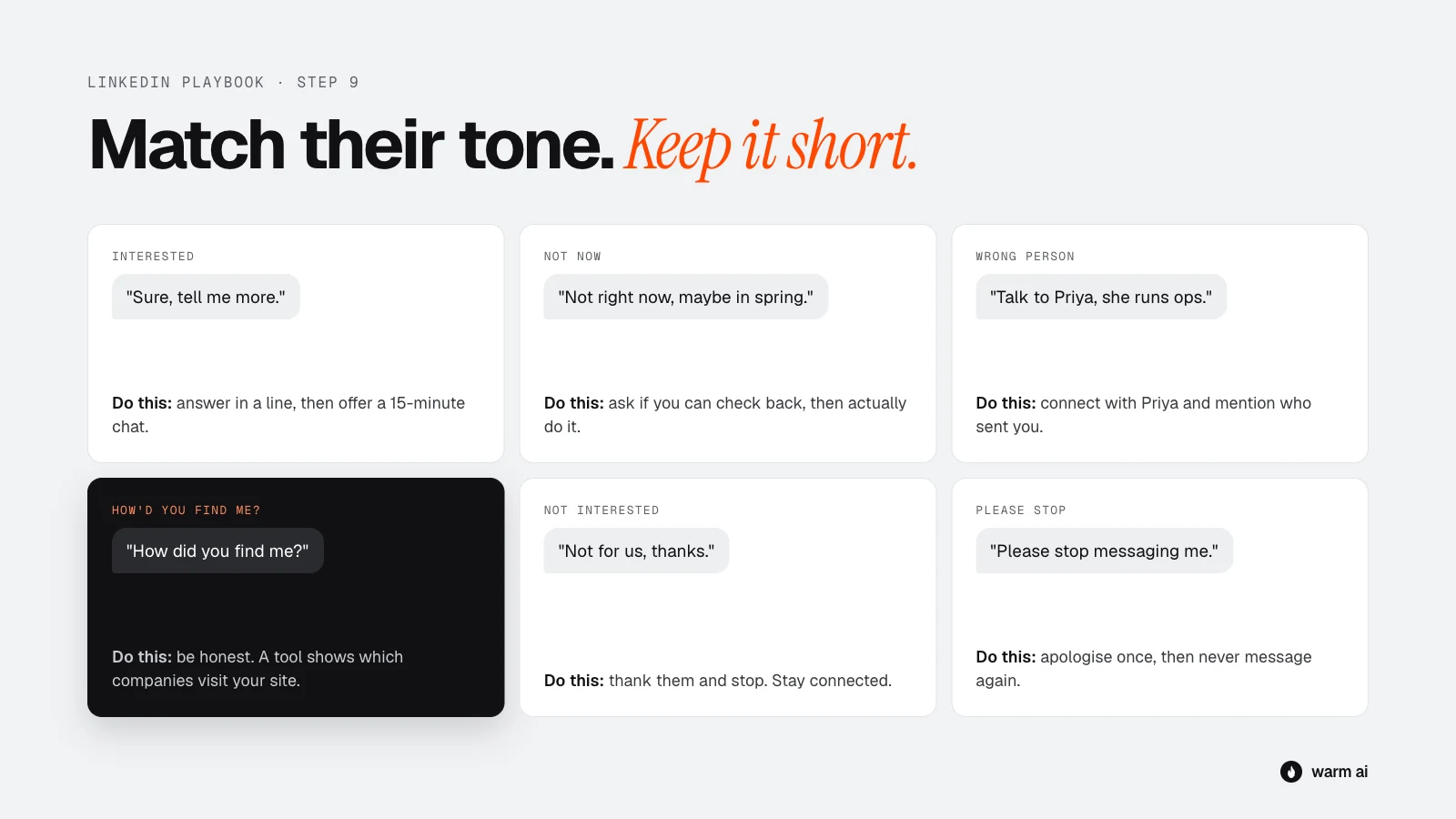
"Sure, tell me more"
Make the next step easy. Answer their question in a line or two, then offer a short call: "Happy to. Easiest is probably a quick 15-minute chat. Here's my calendar: {{link}}. Or send me a couple of times that suit you."
"Not right now"
"Totally get it. Mind if I check back in {{month}}?" Then actually check back. Warm will also show you if they come back to your site sooner.
"You should talk to {{name}}"
"Thanks, really appreciate it. Mind if I mention you sent me?" Then connect with that person and mention the referral in your note.
"How did you find me?"
Be honest: "Fair question. We use a tool that shows which companies visit our website. When a company like yours comes up, I reach out in case it's useful. If it's not relevant, no worries at all."
"Not interested"
"No problem, thanks for letting me know. All the best." Then stop. Stay connected; don't remove them.
"Please stop" or an annoyed reply
"Sorry about that, I won't message again." Add them to your do-not-contact list. Don't argue.
Automating it with HeyReach or Valley
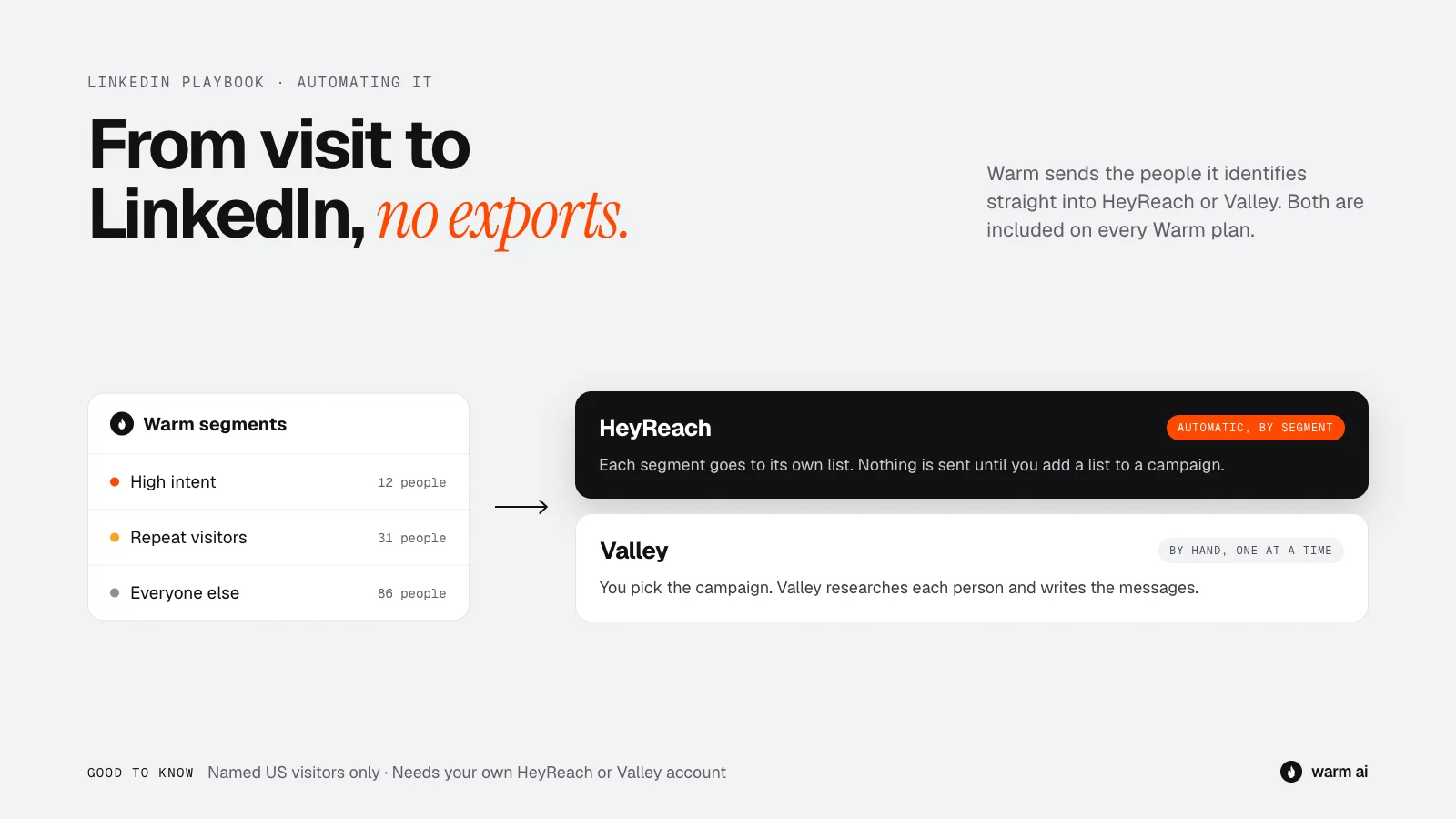
Doing this by hand works well for a handful of Hot visitors a day. Once you're dealing with more, Warm connects to two LinkedIn outreach tools. Both are included on every Warm plan; you need your own account with the tool.
HeyReach
- What it does: sends the people Warm identifies into a HeyReach list, ready for LinkedIn outreach.
- Automatic routing: send each Warm segment (for example High intent, or Repeat visitors) to its own HeyReach list, so each group gets a campaign that fits it. Or send one person at a time from their contact card with Send to HeyReach.
- You stay in control: leads land in a list, not a live campaign. Nothing is sent until you add the list to a HeyReach campaign yourself.
- Good for: teams who want to write their own LinkedIn sequences and run them at scale.
Valley
- What it does: sends a visitor into a Valley campaign you choose. Valley scores them against your ideal customer, researches them and writes personalised messages across LinkedIn and email.
- By hand: you choose who to send, one person at a time.
- Good for: teams who want help writing the messages.
Both need a named person, so they work with visitors Warm identifies by name, which today means US visitors. For UK, EU and other non-US visitors, Warm shows the company, so use Step 2 to find the right person on LinkedIn yourself.
Common mistakes
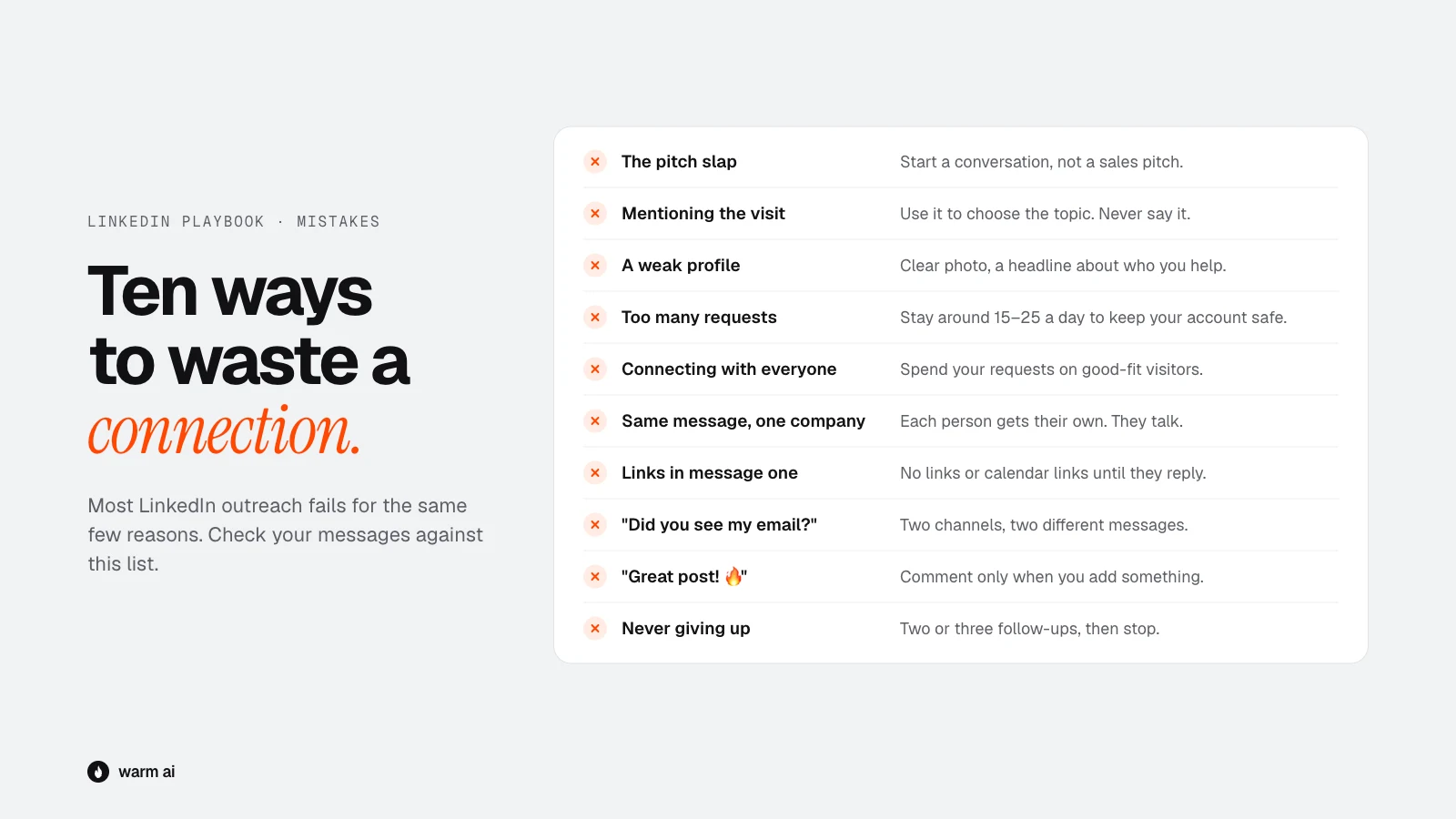
- The pitch slap. A wall of sales text the second they accept. Start a conversation instead.
- Mentioning the visit. "Saw you on our site " gets you ignored, or reported.
- A weak profile. If your profile looks like a sales robot, they won't accept.
- Too many requests. Going over safe limits puts your account at risk.
- Connecting with everyone. Low-fit requests get ignored, which hurts your acceptance rate and wastes your limited requests.
- The same message to five people at one company. They talk to each other.
- Links and calendar links in the first message. It feels like a sales funnel, not a conversation.
- "Did you see my email?" Nagging across channels annoys people.
- Generic comments like "Great post! 🔥" to get noticed. People can tell.
- Never giving up. Five follow-ups on LinkedIn is too many. Two or three, then stop.
What good looks like
These are rough guides. Results vary a lot by industry, seniority and how well you target, so compare yourself to your own numbers over time.
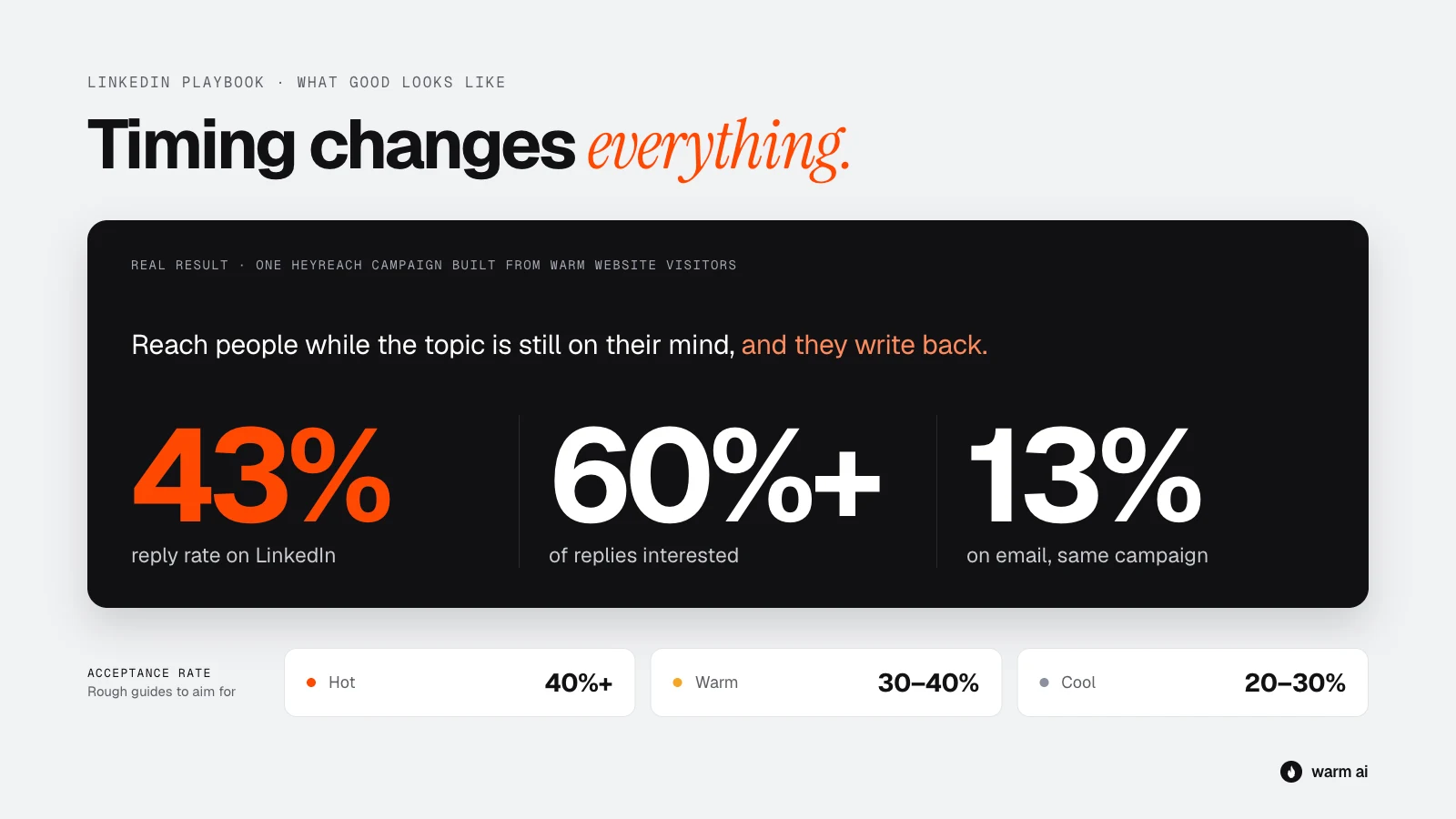
A real example: HeyReach
On a campaign built from Warm website visitors, HeyReach saw a 43% reply rate on LinkedIn (and 13% on email), with 60%+ of replies interested. That's one campaign, not an average, but it shows what's possible when you reach people while the topic is on their mind.
Rough guides
| What to measure | Hot | Warm | Cool |
|---|---|---|---|
| Connection acceptance rate | 40%+ | 30–40% | 20–30% |
| Reply rate (of accepted connections) | 20–40%+ | 10–20% | Under 10% |
| Time to request | Same day | 1–3 days | Only if they return |
Signs something's wrong:
- Acceptance rate under 20%: your profile or your note is putting people off, or you're targeting the wrong people.
- High acceptance, few replies: your first message is too salesy, too long, or not relevant to what they looked at.
- Lots of replies, mostly "not interested": your targeting is off. Tighten your "don't contact" list and focus on Hot visitors.
Track it by group and by template. After a month you'll know which notes and messages work best for you.
Your 15-minute daily routine
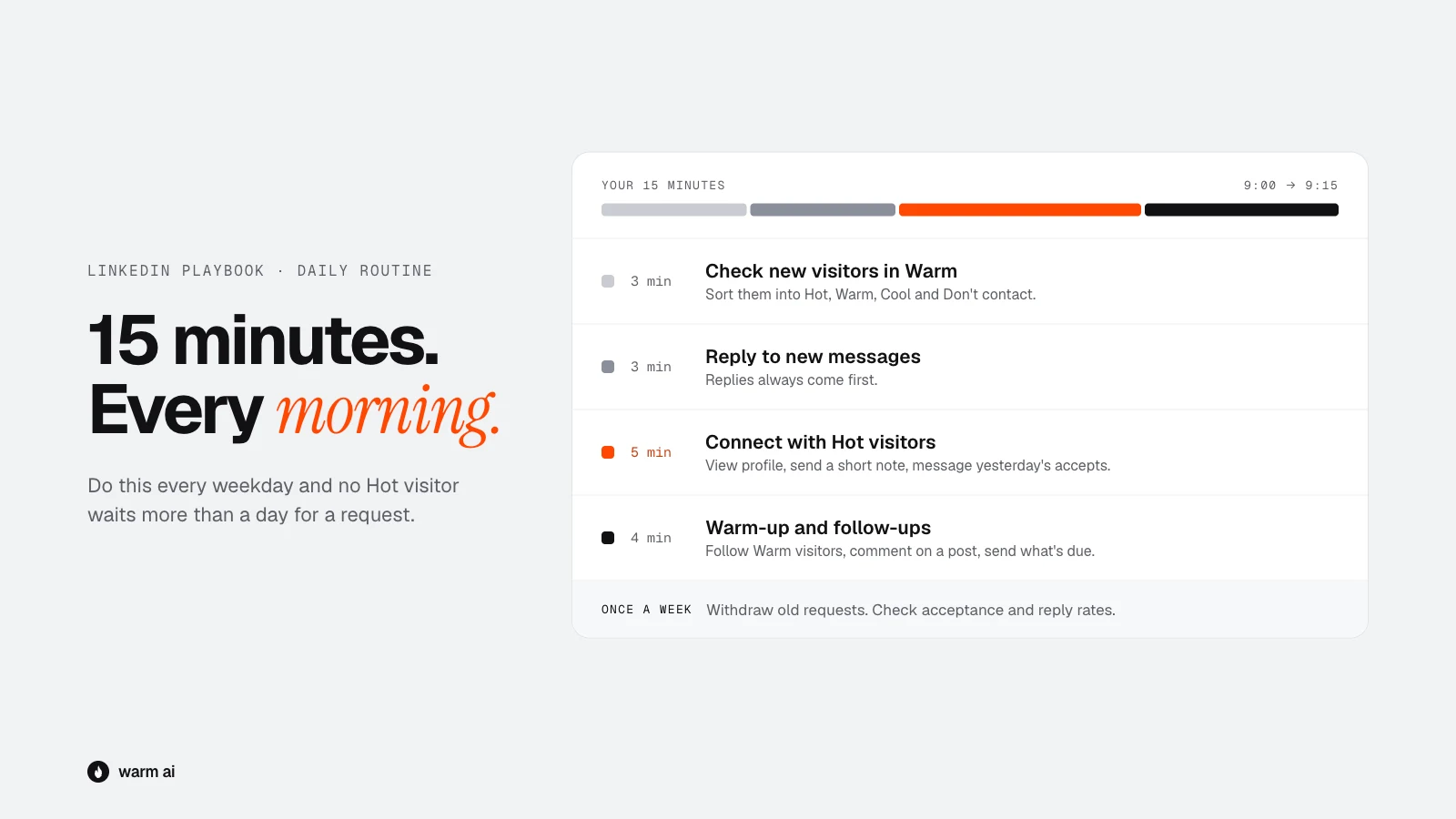
Do this every weekday morning:
- Check new visitors in Warm (3 min). Sort them into Hot, Warm, Cool and Don't contact.
- Reply to anyone who's messaged you (3 min). Replies come first, always.
- Hot visitors (5 min). Find the person, view their profile, send a connection request with a short note. Send first messages to anyone who accepted yesterday.
- Warm-up and follow-ups (4 min). View and follow your Warm visitors, comment on a post or two, send any follow-ups due today.
Once a week: withdraw requests older than 2–3 weeks, and check your acceptance and reply rates by group and template.
Quick-start checklist
- Profile photo, headline, banner and About section updated
- Featured section has one useful thing pinned
- A safe daily request limit agreed (15–25 a day for most accounts)
- "Don't contact" list written down
- Hot / Warm / Cool rules agreed with your team
- Connection notes and first messages customised with your own examples
- Follow-up timings set (by hand or in HeyReach / Valley)
- Email and LinkedIn sequences planned to work together
- Reply scripts saved as snippets
- Daily 15-minute routine in your calendar
Frequently asked questions
Should I mention that someone visited my website on LinkedIn?
No. Use what they looked at to choose what to talk about, but don't mention the visit. Viewing their LinkedIn profile is fine. If they ask how you found them, be honest.
Should I add a note to a LinkedIn connection request?
Use a short note, under 200 characters, for Hot visitors and anyone you have a real reason to connect with. Free accounts can only send a few personalised notes a month, so save them for your best prospects. Test no-note requests for Warm visitors.
How many LinkedIn connection requests can I send a day?
LinkedIn doesn't publish an exact limit and changes it over time. 15 to 25 requests a day is a sensible pace for most accounts. Start lower with a new or quiet account.
Should I use LinkedIn or email to contact website visitors?
Both, for your Hot visitors. People who ignore one channel often reply on the other. Send a different message on each, and stop everything as soon as they reply anywhere.